You wake up in the middle of the night to the sound of your GE washing machine running, no water, no clothes, just the loud hum of an empty drum spinning or a drain pump whirring. It turns on by itself, runs a cycle, and shuts off, only to do it again hours later. This is not a ghost in your laundry room. It is a documented issue affecting many GE top-loading models like the GTW680BSJ1WS, GTW460ASJ4WW, and GTW330ASK0WW. The good news is you are not alone, and in most cases, you can fix it yourself without calling a technician.
The problem of a GE washing machine turning on by itself usually stems from one of three root causes: a leaking water inlet valve triggering automatic drain cycles, the control board entering Flood Mode, or a software glitch that activates Self-Cleaning Mode. Each has distinct symptoms and solutions. In this guide, you will learn how to diagnose the exact cause using error codes, visual clues, and simple reset procedures, and what to do next whether it is a $30 part replacement or a precise 7-turn reset. Let us stop the midnight cycles for a quiet night.
Diagnose the Real Cause First
:max_bytes(150000):strip_icc()/repair-washing-machine-water-inlet-valve-1824606-03-3cb389ab4b214126995bcf693e4ced71.jpg)
Before replacing parts or resetting systems, identify what is actually triggering the spontaneous activation. The fix depends entirely on your washer is behavior when idle.
Check for Water Dripping Into the Tub
The most common reason your GE washer turns on by itself is a slow leak from the water inlet valve. Even a tiny drip can fool the machine into thinking it is flooding.
What to look for:
- Listen closely when the washer is off. Do you hear faint water trickling?
- Open the lid and check the tub after several hours of inactivity. Is there standing water with no cycle run?
- Confirm by drying the tub completely, waiting 4 to 6 hours, then checking again.
If water reappears, the inlet valve is likely failing, and your washer is turning on to drain it automatically.
Access Hidden Error Code 7
GE washers often display generic codes like Error 38, but the real clue is Code 7: Water detected flowing into tub while machine is off.
How to check:
- Press and hold the Start button for 10 seconds.
- The display will cycle through stored error codes.
- If Code 7 appears, the washer detected water flow when it should be inactive.
This is a definitive sign of a faulty water inlet valve.
Test for Voltage at the Valve
To rule out a control board sending false signals, test the valve electrically.
Steps:
- Unplug the washer and turn off water supply.
- Remove the top or front panel to access the water inlet valve located at the rear top.
- Disconnect the valve is wiring harness.
- Set a multimeter to AC voltage.
- Reconnect power and measure voltage at the valve terminals while the washer is off.
Results:
- No voltage plus water dripping equals valve is mechanically failed. Replace it.
- Voltage present equals control board is sending power incorrectly. Likely needs replacement.
In over 90% of cases, the valve itself is the culprit, not the board.
Replace the Water Inlet Valve (Most Common Fix)

If your washer turns on due to water entering when off, replacing the inlet valve solves the problem.
Required Tools and Parts
- Replacement water inlet valve (check model number on back of washer)
- Adjustable wrench
- Phillips screwdriver
- Towels
- Multimeter (optional, for testing)
- Camera or phone (to photograph wiring)
Step-by-Step Replacement
-
Prepare the Washer
– Unplug the unit.
– Shut off both hot and cold water valves.
– Place towels under connections to catch residual water. -
Document Wiring and Connections
– Take a clear photo of the valve is wiring harness and hose connections.
– Note which solenoid terminal connects to hot, cold, and power. Positions vary by model. -
Remove the Old Valve
– Disconnect hoses (use wrench if tight).
– Remove the three mounting screws. These often secure the drain pump too. Do not lose them.
– Gently pull the valve out and disconnect the wiring harness. -
Inspect the Strainers
– Remove the small metal screens inside the valve.
– Clean off sediment or debris. This often causes incomplete sealing. -
Install the New Valve
– Insert the new valve and reconnect the wiring harness (match terminals exactly).
– Reattach hoses with new rubber washers to prevent leaks.
– Secure mounting screws.
– Reconnect drain hose with clamp. -
Test the Repair
– Turn water back on slowly.
– Plug in the washer.
– Let it sit idle for 6 hours. No water should enter the tub.
– Run a normal cycle to confirm proper fill and drain.
Pro Tip: Clean inlet screens every 6 months to prevent future valve issues.
Fix Flood Mode: Reset the Control Board
If your washer turns on and runs the drain pump continuously, even with no water, it may be stuck in Flood Mode.
What Is Flood Mode?
This is a safety feature designed to prevent overflow. If the control board detects excess water or a sensor fault, it forces the drain pump to run nonstop until the risk is cleared.
Symptoms:
- Drain pump runs constantly.
- Control panel lights are off or unresponsive.
- Adding water causes immediate draining, but pump does not stop.
- No water in tub, yet machine will not shut off.
Perform the 30-Minute Auto-Reset
GE washers are designed to exit Flood Mode automatically if left alone.
Steps:
- Ensure the washer is plugged in.
- Do not unplug or press any buttons.
- Wait 30 minutes.
- The system should reset and shut off.
Why it works: Internal logic timers clear the error state after 15 to 30 minutes of continuous drain operation.
If It Does Not Reset
After 30 minutes, if the pump still runs and the panel is dead, the main control board has likely failed.
Replacement indicators:
- No response to power cycling.
- Washer is 12 to 18 months old (common failure window).
- Voltage test showed no signal to valve, ruling out mechanical leak.
Replace the main control board if the 30-minute reset fails.
Clear Self-Cleaning Mode Glitch (GTW330ASK0WW)
Some GE models, especially the GTW330ASK0WW, get stuck in a Self-Cleaning Mode due to software bugs or power surges.
Symptoms of Self-Cleaning Lock
- Washer agitates with no water or load.
- Loud run river or churning noise.
- Cycle runs for hours or days.
- Starts randomly, often at night.
Standard reset methods will not work. You need the 7-turn manual reset.
Execute the 7-Turn Reset
This model-specific procedure forces a system reboot.
Steps:
- Unplug the washer.
- Turn the cycle dial to 12 o’clock (Off).
- Plug it back in. It may start agitating immediately.
- Press and hold the Start/Pause button.
- While holding, turn the dial clockwise exactly 7 times.
– Critical: It must be 7 turns. Other models use 12 or 15. This one is 7. - Listen for a click or relay sound. This means reset succeeded.
- Release the button and dial.
- Unplug again, wait 10 seconds, then plug back in.
Result: The control panel should return to normal. Any error codes can be checked against the schematic on the back of the unit.
Note: If the issue returns, repeat the reset. For recurring problems, consider a power conditioner to stabilize voltage.
Decode Error Codes Correctly

Error codes help pinpoint the issue, but only if you access the right ones.
Key Codes for Spontaneous Activation
| Code | Meaning | Action |
|---|---|---|
| 7 | Water flowing while off | Replace inlet valve |
| 38 | General water flow fault | Check for Code 7 in test mode |
| F01 | A/D converter failure | Replace control board |
| F04 | Drain pump error | Inspect pump; may trigger Flood Mode |
| F02 | Door lock fault | Check lock mechanism and wiring |
Enter Diagnostic Mode
To see stored codes:
- Press and hold Start/Pause and Select for 5 seconds.
- Wait for dE or dF to appear.
- Use + or – to scroll through error history.
Alternatively, hold Start for 10 seconds to cycle through recent faults.
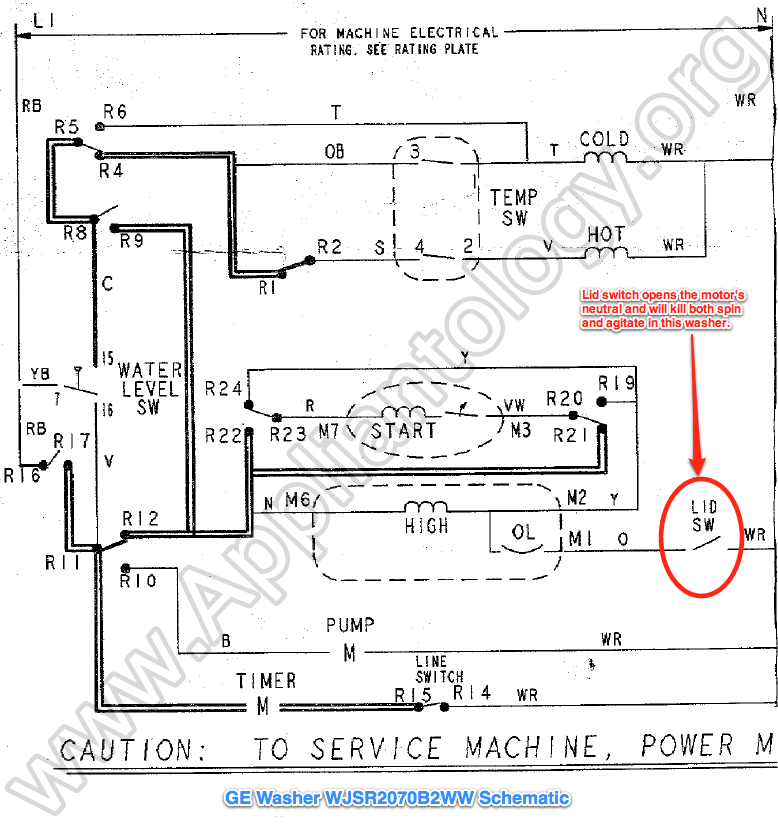
Warning: The schematic on the back of the washer is often outdated. Use it as a reference, not a definitive guide.
Follow the Troubleshooting Flowchart
Use this decision tree to diagnose fast.
Water in Tub When Off?
- Yes → Check for Code 7 → Replace water inlet valve.
- No → Is pump running continuously?
- Yes → Leave plugged in for 30 minutes → Still running? Replace control board.
- No → Is washer agitating with no water?
- Yes → Model GTW330ASK0WW? → Perform 7-turn reset.
- No → Unresponsive panel? → Replace control board.
This process eliminates guesswork and prevents unnecessary part replacements.
Prevent Future Issues
Avoid recurrence with these maintenance habits.
Clean Inlet Screens Regularly
- Shut off water and disconnect hoses.
- Remove and rinse metal strainers in the inlet valve.
- Reinstall with new washers every 6 to 12 months.
Stabilize Power Supply
- Plug the washer into a dedicated outlet.
- Use a surge protector or power conditioner to prevent voltage spikes that trigger software glitches.
Use Proper Detergent
- Excess suds can trick water level sensors into thinking there is overflow.
- Use HE detergent and follow dosage instructions.
Level the Washer
- Uneven machines vibrate more, loosening connections and damaging sensors.
- Use a bubble level and adjust feet until stable.
When to Call GE Support
If DIY fixes fail and your washer is under 2 years old, contact GE.
- Phone: 1-800-626-2222 or 1-800-432-2737
- Ask about goodwill repair programs. They may cover control board replacement even after warranty expires.
Keep your model and serial number ready (found on the back or inside the lid).
Key Takeaways for Fixing Your GE Washing Machine Turning On By Itself
A GE washing machine turning on by itself is usually fixable without a service call. In most cases, it is a failing water inlet valve causing slow leaks that trigger automatic drain cycles. Confirm with Error Code 7 and replace the valve. For no-water drainage, try the 30-minute Flood Mode reset. For random agitation, especially on model GTW330ASK0WW, use the 7-turn manual reset. By following these steps, you will restore quiet nights and reliable laundry cycles. No technician needed.
Frequently Asked Questions About GE Washing Machine Turning On By Itself
Why does my GE washing machine turn on by itself at night?
This usually happens because a failing water inlet valve allows water to drip into the tub when the machine is off. The sensor detects this water and triggers an automatic drain cycle, making the machine turn on unexpectedly.
How do I know if my water inlet valve is bad?
Check for water in the tub after the washer has been off for several hours. Access Error Code 7 by holding the Start button for 10 seconds. If Code 7 appears, the inlet valve is failing and needs replacement.
What is Flood Mode on a GE washer?
Flood Mode is a safety feature that activates when the control board detects excess water or a sensor fault. The drain pump runs continuously to prevent overflow. Leave the washer plugged in for 30 minutes to allow the system to auto-reset.
Does the 7-turn reset work on all GE washers?
No. The 7-turn manual reset is specific to models like the GTW330ASK0WW. Other GE washers may require different reset sequences, such as 12 or 15 turns. Check your model is specific procedure.
Can I fix this without replacing parts?
Sometimes. Flood Mode often clears after 30 minutes without any part replacement. The 7-turn reset can clear software glitches without hardware changes. However, a leaking inlet valve always requires replacement.
When should I call GE customer support?
If the 30-minute reset fails, the 7-turn reset does not work, and the water inlet valve is confirmed dry, the control board likely needs professional replacement. Call GE at 1-800-626-2222 if your unit is under 2 years old.