Is your Bosch washing machine beeping constantly and disrupting your home? You’re not alone. Many owners of Bosch models, especially VarioPerfect, Serie 4, Serie 6, and Exxcel series, report persistent beeping that ranges from a minor annoyance to a sign of a serious fault. The good news: in most cases, constant beeping is not a mechanical failure, but a user-adjustable audio setting that can be silenced in minutes.
This guide will help you determine whether your beeping is a configurable alert or a symptom of a deeper issue. You’ll learn how to disable both button and end-of-cycle beeps on your specific Bosch model, plus troubleshoot real faults if the noise persists.
Silence Button Beeps on VarioPerfect Models

If your Bosch washing machine beeps every time you press a button, it’s likely the control panel feedback sound. On VarioPerfect, Serie 4, and Serie 6 models with a digital display, you can disable this sound using a hidden service menu.
Enter Volume Adjustment Mode
- Turn the program dial to Cotton 2:30 (2 hours 30 minutes).
- Press and hold the Start/Reload button.
- While holding it, turn the dial one click clockwise (to Delicate or Wool).
- The display will change, confirming entry into the volume settings.
Disable Button Press Beeping
- Press the Finished In button repeatedly.
- The display cycles through volume levels.
- Stop when it shows 0 (OFF) to silence all button feedback sounds.
Pro Tip: If you prefer a quiet but noticeable tone, set it to 1 (Low) instead of Off.
Stop End-of-Cycle Beeping

The loud, repetitive alarm at the end of a wash cycle is often the main culprit behind constant beeping. You can disable or lower this alert independently from button sounds.
Adjust Completion Alarm Volume
- With the dial still in the service menu (or re-enter if needed), turn it to the next program (e.g., from Delicate to another setting).
- Press the Finished In button to cycle through alarm volume levels.
- Select 0 (OFF) to completely silence the end-of-cycle alarm.
Warning: Disabling the alarm means you must manually check when cycles finish. Wet clothes left in the drum for over 8 to 12 hours can develop mold and odors.
Keep Drum Clean Alerts On
While silencing other beeps, consider leaving the Drum Clean reminder active. It triggers every 2 to 3 months or after 30 cycles, helping maintain hygiene and machine performance. This appears as a separate prompt in the same menu.
To save settings, turn the dial to Off. The machine exits automatically.
Use Time-Based Dial Settings on Serie 4/6
Some Bosch and Siemens models use time positions on the dial (1:00, 2:00, 3:00) to access sound settings. This method works on many Serie 4 and Serie 6 units with digital time displays.
Enter Service Menu
- Turn the dial to 1:00 (Position 1).
- Press and hold the Start button until you hear a confirmation beep.
Set End-of-Cycle Alarm
- Turn dial to 2:00 (Position 2).
- Press Start to cycle through alarm volumes.
- For silence, select Off or turn dial to 12:00 (Off).
Expert Note: It’s safer to set this to Low rather than Off to prevent forgotten wet loads.
Adjust Button Feedback Volume
- Turn dial to 3:00 (Position 3).
- Press Start to cycle through sound levels.
- Recommended: Volume 2 (Medium-Low) for subtle feedback.
Exit Settings
Turn the dial to 12:00 (Off). The machine exits and saves automatically.
Adjust Beep Volume on Models Without Display
If your Bosch has indicator lights instead of a digital screen, use the Eco button and Spin controls to adjust sound levels.
Enter Beep Adjustment Mode
- Power off the machine completely.
- Wait 30 seconds for full reset.
- Turn it back on.
- Press and hold the Eco button while turning the dial to 40°C.
- The Rinse Hold light illuminates, confirming entry.
Change Sound Level
- Press the Eco button to cycle through options:
• 1: Low
• 2: Medium
• 3: High
• 4: Off (Silent) - Stop when the desired level is reached.
Save and Exit
- Turn the dial back one position (e.g., to 30°C) or to Off.
- Power off, wait a few seconds, then power on.
- Settings are now permanently saved.
Fix Beeping on Exxcel Models

Specific Bosch Exxcel models like WAQ28461GB and WAQ283S0GB require unique steps. Standard methods often fail because users reference the wrong manual. Use the Instructions for Use (IU), not the Installation Instructions (II).
Method A: Single Click Entry
- Set dial to Off.
- Turn dial one click clockwise (display lights up).
- Press and hold the Eco Perfect button.
- While holding, turn dial one click clockwise.
- Press the Spin Cycle Selection button (under Rinse Hold).
- Press repeatedly to cycle to Silent.
- Turn dial to Off to save.
Method B: Double Click Entry
Use this if Method A fails or your model lacks a clock button.
- Set dial to Off.
- Turn dial one click clockwise.
- Hold the Eco Perfect button.
- While holding, turn dial two clicks clockwise.
- Press the Spin Cycle Selection button.
- Cycle to Silent.
- Turn dial to Off.
User Verified: Multiple users confirmed success with Method B on Exxcel units from 2014 to 2015.
Diagnose Fault-Related Beeping

If your machine still beeps constantly after silencing settings, or if beeping is accompanied by error lights, failure to start, or strange noises, it may signal a fault.
Beeping and Door Won’t Open
Likely Cause: Water in drum or failed door lock.
Fix:
1. Check if End light is on.
2. If water remains, use the emergency drain hose behind front bottom panel.
3. Unplug machine for 5 to 10 minutes to reset the electronic lock.
4. Try opening again.
Beeping and Machine Won’t Start
Possible Causes: Door not latched, power issue.
Steps:
1. Ensure door clicks shut securely.
2. Check circuit breaker and GFCI outlet.
3. Test outlet with another device.
4. If no response, perform a power reset (unplug 30 seconds, plug back in).
Beeping and Not Spinning
Cause: Unbalanced load or overload.
Fix:
1. Open door and rearrange laundry evenly.
2. Remove heavy items (towels, blankets).
3. Add smaller items (socks, shirts) to balance.
4. Restart cycle.
Pro Tip: Never wash a single large item alone. Always pair with smaller ones.
Beeping and Not Draining
Cause: Clogged filter or kinked hose.
Steps:
1. Inspect drain hose for kinks or blockages.
2. Locate pump filter (front bottom panel).
3. Place towel underneath, unscrew cap slowly.
4. Remove lint, coins, or debris.
5. Reassemble and restart.
Loud Banging and Beeping
Possible Issues: Foreign object, worn bearings, failed suspension.
Check:
1. Run an empty spin cycle.
2. Listen for coins or buttons stuck between drum and tub.
3. If noise continues, suspect worn drum bearings or broken suspension rods.
4. These require professional repair. Do not continue use.
Leaking and Beeping
Common Causes: Loose hose, damaged seal, clogged drawer.
Fix:
1. Tighten inlet and drain hoses.
2. Inspect door seal for tears or trapped debris.
3. Remove detergent drawer and clean compartments with warm water.
4. Wipe seal dry and leave door ajar after use.
Prevent Error Beeping with Maintenance
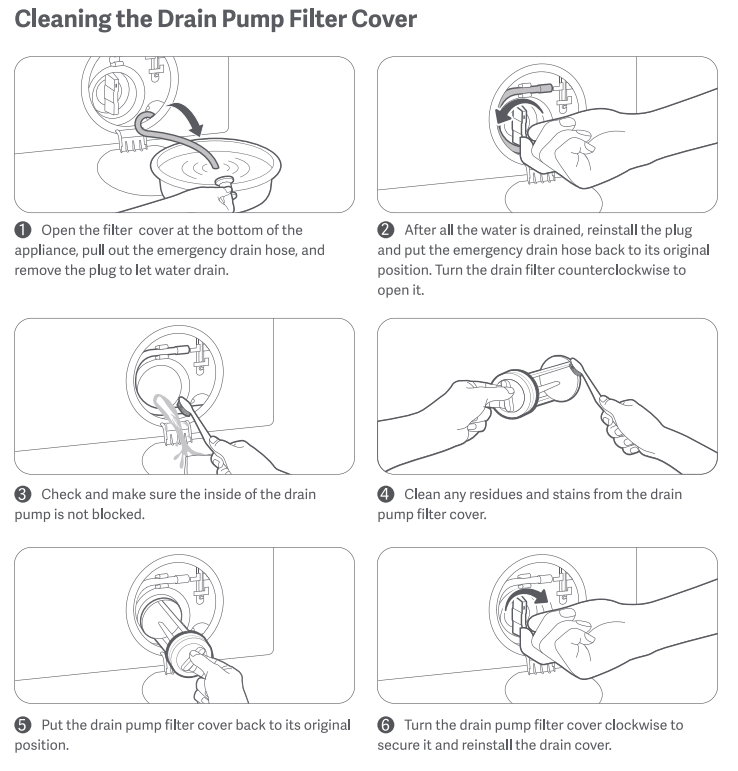
Many beeping issues stem from poor maintenance. Follow these steps to keep your Bosch running quietly and efficiently.
Clean Pump Filter Monthly
This prevents drainage errors and alerts. It removes lint, hair, and coins. Use a towel to catch residual water.
Run Drum Clean Every 2 to 3 Months
This eliminates mold, mildew, and odors. Use dedicated drum cleaner or white vinegar plus baking soda. Select hottest cycle (90°C) with no laundry.
Wipe Door Seal Weekly
This prevents black mold buildup. Use damp cloth and mild detergent. Dry thoroughly after each wash.
Use HE Detergent Only
Non-HE detergent creates excess suds. Suds trigger imbalance errors and beeping. Use half the recommended amount. Bosch machines are highly efficient.
When to Call a Professional
Some issues cannot be fixed at home. Contact Bosch support or a certified technician if you experience internal leaks (not from hoses or drawer), persistent grinding or banging after load balancing, control panel unresponsive after reset, door stays locked after power cycle, or error codes that won’t clear (e.g., E15, E21, E25).
Bosch Support Info
Customer Service (US): 1-800-944-2904 (24/7)
Service Locator: www.bosch-home.com/us/support
Key Takeaways for Silencing Your Bosch Washing Machine
Constant beeping in your Bosch washing machine is usually not a sign of failure, but a configurable alert that can be silenced in minutes. Whether it’s the end-of-cycle alarm or button feedback, the fix lies in accessing your model’s hidden settings menu. Use the correct method for your model (VarioPerfect, Exxcel, or dial-based) and you’ll restore peace to your laundry room.
If beeping continues after adjustments, check for common faults like clogs, imbalances, or door issues. With regular maintenance (filter cleaning, drum washes, and proper detergent use), your Bosch can run quietly and reliably for years.
Don’t ignore persistent error beeps. They’re your machine’s way of asking for help. Address them early to avoid costly repairs.
Frequently Asked Questions About Bosch Washing Machine Beeping Constantly
Why does my Bosch washing machine beep constantly after I press buttons?
Your Bosch is beeping because the button feedback sound is enabled. This is a configurable setting, not a fault. Access your model’s service menu to set volume to 0 (Off) or 1 (Low).
How do I stop the end-of-cycle alarm on my Bosch washing machine?
Enter the hidden service menu (method varies by model). Navigate to the completion alarm setting and select 0 (OFF). On Serie 4/6 models, use dial positions 2:00 and press Start to cycle through levels.
Why does my Bosch beep and not spin?
This indicates an unbalanced load. Open the door and rearrange laundry evenly. Remove heavy items and add smaller ones to balance the drum before restarting.
Can I disable beeping on a Bosch Exxcel model?
Yes. Use the Eco Perfect button method. Set dial to Off, turn one click clockwise, hold Eco Perfect, turn dial again, then press Spin Selection to cycle to Silent. Method B (double click) works if Method A fails.
Does constant beeping mean my Bosch needs repair?
Not necessarily. Most constant beeping is adjustable audio feedback. However, if beeping persists after disabling settings and is accompanied by error codes, failure to start, or unusual noises, it may indicate a fault requiring professional service.
How often should I maintain my Bosch to prevent error beeping?
Clean the pump filter monthly, run a drum clean cycle every 2 to 3 months, wipe the door seal weekly, and use only HE detergent. Regular maintenance prevents drainage errors and imbalance alerts.