
Your Bosch washing machine suddenly stops mid-cycle. A cryptic code flashes on the display. You are not alone. These error codes are precise alerts from your machine’s internal system, pointing directly to problems like blocked pumps, door lock failures, or excess foam. This guide breaks down every major Bosch washing machine error code, explains what it means, and gives you step-by-step solutions to fix common faults fast.
Decode Display and Indicator Types on Your Bosch Washer
Identify Your Error Output System
Bosch washers use three main ways to communicate faults. Digital displays show alphanumeric codes like E17 or F18, and these are the easiest to diagnose. Older or basic models rely on blinking LED patterns, such as five quick flashes followed by a pause, which correspond to specific issues like drainage failure or door lock errors. Always check your user manual for blink-code interpretation.
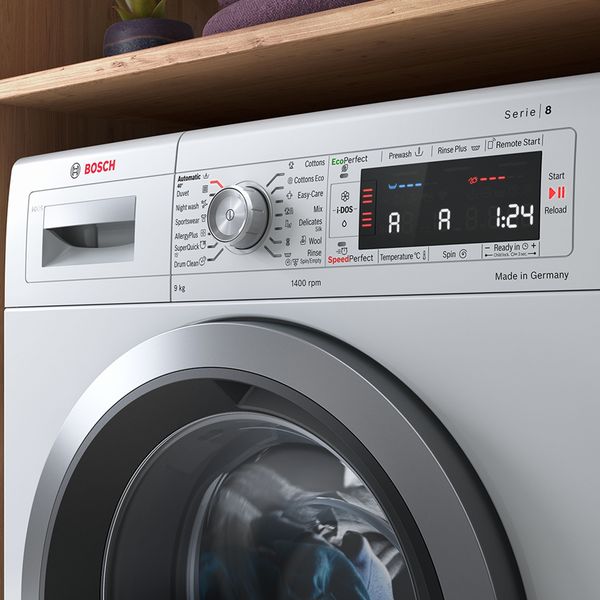
Symbol-based alerts include a drum with water droplets, which means cleaning is needed. Soap bubbles indicate too much detergent. A flashing pause icon signals energy-saving mode is active. If you see CL or CHILD, the child lock is on. Press and hold the Start button for 5 seconds to disable it.
Recognize Non-Error Symbols
Not every alert is a malfunction. A flashing END symbol usually means the cycle finished, but if water remains in the drum, it may indicate a drain issue. When Ready in Time flashes, it could mean the feature is misconfigured. Set it to zero. The drum with water droplets icon tells you it is time to run a 90°C self-clean cycle to remove mold and detergent buildup. This prevents odors and sensor errors. The soap bubbles symbol means excessive suds were detected. Reduce detergent next time.
Reset Your Washer Before Attempting Repairs
Perform a Power Cycle Reset
Before disassembling anything, try a power cycle. It clears temporary glitches and resets the control board. Turn the machine off using the power button. Unplug it from the wall socket. Wait at least 30 seconds. This allows capacitors on the PCB to discharge. Plug it back in and restart the cycle. For many transient faults like E32 or E90, this simple step resolves the issue.
Use Button or Dial Reset Methods
Some models require a button combination. Press and hold the Start/Reload or Pause/Play button for 3 to 5 seconds to force a reboot. For persistent E16 or F16 door lock errors, perform the PCB reset. Turn the program dial to Off. Rotate to the 6:00 position. Press and hold the Spin/RPM button. While holding, turn the dial to 7:00. Wait 3 seconds, release the button, then return the dial to Off. This reinitializes the door lock circuit.
Fix Door Lock Errors on Your Bosch Washing Machine

Confirm Proper Door Closure
Error codes E16, F16, E34, and F34 all point to door lock failure. First, ensure the door closes fully. Listen for the audible click. If it is missing, something may be blocking the seal. Open the door and check for socks, fabric, or foreign objects jammed in the rubber gasket. Remove them and close the door firmly. If the load is oversized, redistribute or reduce it. Overfilling prevents the door from latching.
Inspect and Replace the Door Lock Mechanism
If the door clicks but the error persists, the lock mechanism is likely faulty. Unplug the machine. Pry off the outer retaining band of the door seal using a flathead screwdriver. Pull the rubber bellow inward to access the lock. Locate the two plastic pips on the side of the lock. Press them inward to release the unit. Disconnect the electrical plug. Install the new door lock, reconnect the wiring, snap the pips into place, and reseat the seal. Reattach the retaining band using the spring tool. After replacement, perform the PCB reset to clear residual error memory.
Resolve Water Inlet Problems Quickly

Check Tap and Hose Connections
Codes E17, F17, F29, E92, and E:92/-01 mean no water is entering. First, confirm the water tap is fully open. Turn it off, disconnect the inlet hose, and inspect the filter inside the hose connector. Use a small brush to clean out sand, rust, or debris. For models with AquaStop hoses, do not submerge the device. Wipe it clean instead. Reconnect the hose and ensure it is tight. Check for kinks or pinching, especially behind the machine.
Test Water Pressure and Flow Rate
Bosch washers need a minimum flow rate of 10 liters per minute. If water trickles in, pressure is too low. Contact a plumber. For H9E with water tap icon, the issue is hot water-specific. Ensure the hot hose is connected to the hot tap, not cold. Clean the strainer in the hot water valve. If only cold water works, the hot inlet solenoid may be faulty.
Clear Drainage Faults Effectively
Unclog the Drain Hose and Siphon
E18 and F18 mean water is not draining. Turn the program OFF and unplug the machine. Water may be hot. Check the drain hose for kinks or sharp bends. Loosen the hose clip at the siphon connection, remove the hose, and drain residual water into a bucket. Clean the spigot and hose end. Reconnect securely. To test, pour 1 liter of water into the detergent drawer and run the DRAIN program.
Clean the Drain Pump Filter
Open the front service flap at the bottom. Place a towel underneath. Slowly unscrew the pump cover. Water will spill out. Remove debris like coins, hair, or lint from the impeller. Ensure the impeller spins freely. Clean the housing and reinsert the cover, screwing it tightly until the handle is vertical. A loose cap causes E:36/-25/-26 errors. After cleaning, run a leak test. Pour 1 liter of water into the machine and start draining.
Handle Foam and Detergent Issues
Reduce Detergent and Eliminate Suds
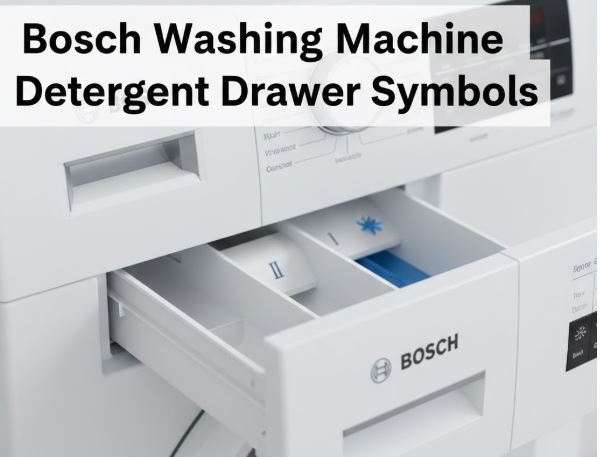
E33 and F33 mean excess foam was detected. This usually happens from too much detergent or non-HE products. Stop the cycle. Mix 1 tablespoon of fabric softener with 500ml of water and pour it into Compartment II, the main wash compartment. This breaks down suds. Resume the rinse cycle. For the next wash, use half the recommended dose. Modern Bosch washers need very little detergent. Avoid adding extra water during operation, as this triggers E:30/-20.
Correct Load Imbalance Errors
Redistribute Laundry for Even Spinning
E32, F32, and H32 indicate an unbalanced load. The drum slows or stops spinning to prevent damage. Open the door and redistribute bulky items like towels or jeans. Mix large and small pieces for better weight distribution. Close zippers on duvet covers to prevent bunching. Avoid washing single heavy items alone. Add smaller garments. Select the correct cycle for load size. If END flashes with E32, the machine completed but could not spin fully.
Address Motor and Drive Failures
Check for Drum Obstructions
Codes E21, F21, F43, E50, F50, and E40 signal motor or tachogenerator faults. First, unplug the machine and manually rotate the drum. If it does not turn, something is jammed. Remove it. If the drum spins freely but the error returns, the issue is internal. Worn carbon brushes, motor failure, or a faulty tachogenerator require professional repair. E80 is a drive circuit fault. Only an authorized technician can fix it.
Diagnose Heating and Sensor Errors
Test Heating Element and Temperature Sensors
E19 and F19 mean heating takes too long. This likely indicates a failed heating element or NTC temperature sensor. Reset the machine. If the error returns, the part must be replaced by a professional. E20 and F20 mean unexpected heating, pointing to a control board fault. E30 and E50 are temperature sensor errors. For E26, E38, and E70, the pressure sensor or chamber is faulty. If accessible, clean the pressure chamber tube. A blocked hose causes false readings.
Respond to Leaks and AquaStop Alarms
Shut Off Water and Contact Support Immediately
E22, E23, F23, and E:00/-23 mean water is in the base tray. Your machine is leaking. Turn off the water tap immediately. Do not restart the washer. These codes trigger the AquaStop safety system, which halts operation to prevent flooding. Possible causes include a cracked hose, failed pump seal, or loose connection. Due to electrical risks and potential water damage, contact Bosch support at 1-800-944-2904. DIY repairs are not recommended.
Solve Communication and Board Errors
Reset and Evaluate PCB Faults
E45, E56, E90, E91, and E92 indicate communication breakdowns between control modules or software glitches. Reset the machine. If errors persist, the main control board is likely failing. E93 often pairs with a tap icon. Check water pressure first. If pressure is fine, the board may misread sensors. These issues require professional diagnosis and possible firmware updates or board replacement.
Frequently Asked Questions About Bosch Washing Machine Error Codes
What is the most common Bosch washing machine error code?
E18 and F18 are among the most common errors. They indicate drainage problems, usually from a clogged drain pump filter or kinked drain hose. Cleaning the filter often resolves this issue within minutes.
How do I reset my Bosch washing machine after an error?
Perform a power cycle reset. Turn the machine off, unplug it, wait 30 seconds, then plug it back in. For persistent errors like E16, use the specific PCB reset procedure involving the Spin/RPM button and dial positions.
Can I fix a door lock error E16 myself?
Yes. First, ensure the door is fully closed with no obstructions. If the error persists, replace the door lock assembly. Unplug the machine, access the lock through the door seal, disconnect the old lock, and install a new one.
What does E33 mean on my Bosch washer?
E33 indicates excessive foam was detected. This happens when too much detergent is used or non-HE products are added. Reduce detergent by half for the next wash. Use the fabric softener and water mixture to clear existing suds.
Should I be worried if E22 appears?
Yes. E22 means water is in the base tray, indicating a leak. Turn off the water tap immediately and do not use the machine. Contact Bosch professional support. This is not a DIY repair situation due to electrical and flooding risks.
How do I prevent Bosch washing machine errors?
Perform routine maintenance. Clean the drain pump filter monthly. Use HE detergent in correct dosages. Leave the door ajar after each load to prevent mold. Redistribute loads evenly and avoid overfilling.
Key Takeaways for Fixing Bosch Washing Machine Error Codes

Most Bosch washing machine errors stem from simple causes. Clogged filters, excess detergent, or minor glitches trigger the majority of codes. By understanding what each code means, you can avoid expensive service calls for approximately 80% of issues. Always unplug the machine before performing any maintenance. Clean your drain pump filter monthly. Use only HE detergent, and run drum clean cycles periodically to prevent residue buildup.
When in doubt, especially with leaks, motor faults, or board errors, contact authorized Bosch support. Keep your model number, found on the door rim or inside the door, handy for faster service. A simple reset or filter clean often saves a costly repair visit.



