
Your LG washing machine won’t open. Water pools inside, clothes are trapped, and the door is stuck, no matter how hard you pull. You are not alone. A locked LG washer is a common frustration, but it is rarely a disaster. Most of the time, the door stays locked for a good reason: safety. LG front-loaders use smart sensors to prevent scalding, flooding, and mechanical damage. The key to unlocking it? Understanding why it is locked first.
The main culprit is usually one of five issues: water in the drum, high internal temperature, an active cycle, a power glitch, or the Child Lock (CL) being enabled. Forcing the door can break the latch or flood your floor. Instead, follow the right steps, starting with the simplest fixes. This guide shows you how to unlock your LG washing machine safely, whether it is mid-cycle, after a power cut, or stuck due to a mechanical fault.
Wait for Cool-Down After Hot Wash

If the cycle just ended and the door will not open, heat is likely the cause. LG machines lock the door when internal temperatures exceed safe levels. Even after the cycle stops, hot water or steam can cause burns. The system uses a thermal sensor to keep the door locked until the drum cools.
Thermal Lock Release Time
You will hear a click when it unlocks. This takes 2 to 5 minutes. Do not force the door. Wait. If you are impatient, gently touch the door glass. If it is warm, give it more time. Forcing it risks steam burns or damaging the lock assembly.
Drain Water to Unlock Door
Water in the drum triggers an automatic lock to prevent flooding. If the machine powers on but the door will not open, run a Drain and Spin cycle to remove water first.
Run Drain and Spin Cycle
Press and hold Start/Pause to stop the current cycle. Rotate the cycle dial or tap the screen to select Drain and Spin. Press Start/Pause again. The machine will pump out water and spin briefly. Once complete, the door should unlock with a click. If No Spin appears, press the Spin Speed button until a spin option is selected. Some models block draining if spin is off.
Manually Drain via Pump Filter

If the washer will not power on or will not drain, you must manually drain the water.
Unplug the machine for safety. Place a shallow pan under the front lower access panel, usually on the left. Open the panel to reveal the emergency drain hose and filter cap. Pull out the small hose, remove its cap, and let water flow into the pan. Hold it to control the stream. Once drained, unscrew the large filter cap, turn left, clean out lint, coins, or debris, then reinstall it tightly. Recap the emergency hose and tuck it back. Plug in the washer and try opening the door.
Pro Tip: Keep towels nearby. Up to a gallon of water may drain quickly.
Disable Child Lock (CL) Mode
If buttons do not respond and CL flashes, the control lock is active. The Child Lock disables all controls and often prevents door opening. To disable it, you must press a specific button combination.
Unlock Panel with Button Combo
Ensure the washer is powered, even in standby. Press and hold Delay End plus Add Item for 3 seconds. Some models use Option plus Spin or Temp plus Rinse. Look for buttons with a lock icon linked by a line. The CL display should vanish, and buttons will respond. Now press Start/Pause to unlock the door, if water and heat levels allow.
Fix Blinking CL That Will Not Clear
If CL blinks and the combo does not work, confirm you are pressing the correct buttons. Unplug the washer for 5 minutes, then plug it back in. Immediately retry the button hold. If it still fails, the control board or door lock may be faulty. Professional service is needed.
Recover After Power Outage
A brief power cut can leave the door locked, even if the machine seems off. LG washers have a safety timer: after 5 minutes of power loss, the door lock disengages automatically.
Wait for Auto-Unlock
If the outage lasted longer, the door may already be unlocked. Plug the machine back in, wait for the display to light up, then try opening the door.
Restart and Drain if Needed
If the cycle was interrupted, press Start/Pause to resume or cancel. If water remains, run Drain and Spin. Once drained, the door should unlock. Never force the door open during this process. Wait for the system to confirm safety.
Reset for Electronic Glitches
If the drum is empty, cool, and the cycle is done, but the door stays locked, try a reset. Electronic glitches can keep the lock solenoid engaged.
Perform Hard Power Reset
Unplug the washer from the wall. Wait 3 to 5 minutes. This fully discharges the control board. Plug it back in. Immediately press Start/Pause. The door should unlock with a click. This fix resolves most ghost lock issues caused by software hiccups.
Realign Door Latch Mechanically
If the door was opened mid-cycle before, the latch may be misaligned. Unplug the machine. Wait 1 to 2 minutes. Push the door firmly inward while pulling the handle. This realigns the catch with the lock. If it clicks open, avoid opening mid-cycle in the future.
Use Mechanical Release as Last Resort
When all else fails, mechanical methods can free a stuck door. Use these carefully, as they carry risk of damaging the door seal or lock assembly.
Try the Firm Tap Method
A stuck solenoid may respond to vibration. Use your palm to firmly tap the door near the handle. Listen for a click. This means the lock released. If this works, the lock is failing. Replace it soon.
Slide Plastic Card to Trip Latch
Use a stiff card like a credit card or ID. Insert it into the gap between the door and frame, near the latch side, usually top-left. Slide it down while pushing inward to depress the lock catch. Pull the handle as you push. This mimics the internal release. It works best on slightly misaligned doors.
Pull Wire Loop to Unlock
Users report success with this trick. Cut a 3-foot length of strong string or fishing line. Thread it through the door gap at the top, wrapping it around the inner door edge. Pull both ends downward and toward the handle. The loop applies inward pressure, retracting the latch. It may take a few tries.
Access Lock from Top Panel
For complete access, move the washer away from the wall. Remove two screws from the rear of the top panel. Slide the panel back and lift it off. Reach down to the door lock assembly, right side of door opening. Push the lock mechanism left or inward with your finger or a screwdriver. Pull the door open. Only do this if you cannot retrieve clothes otherwise.
Replace Faulty Lock or Call Technician
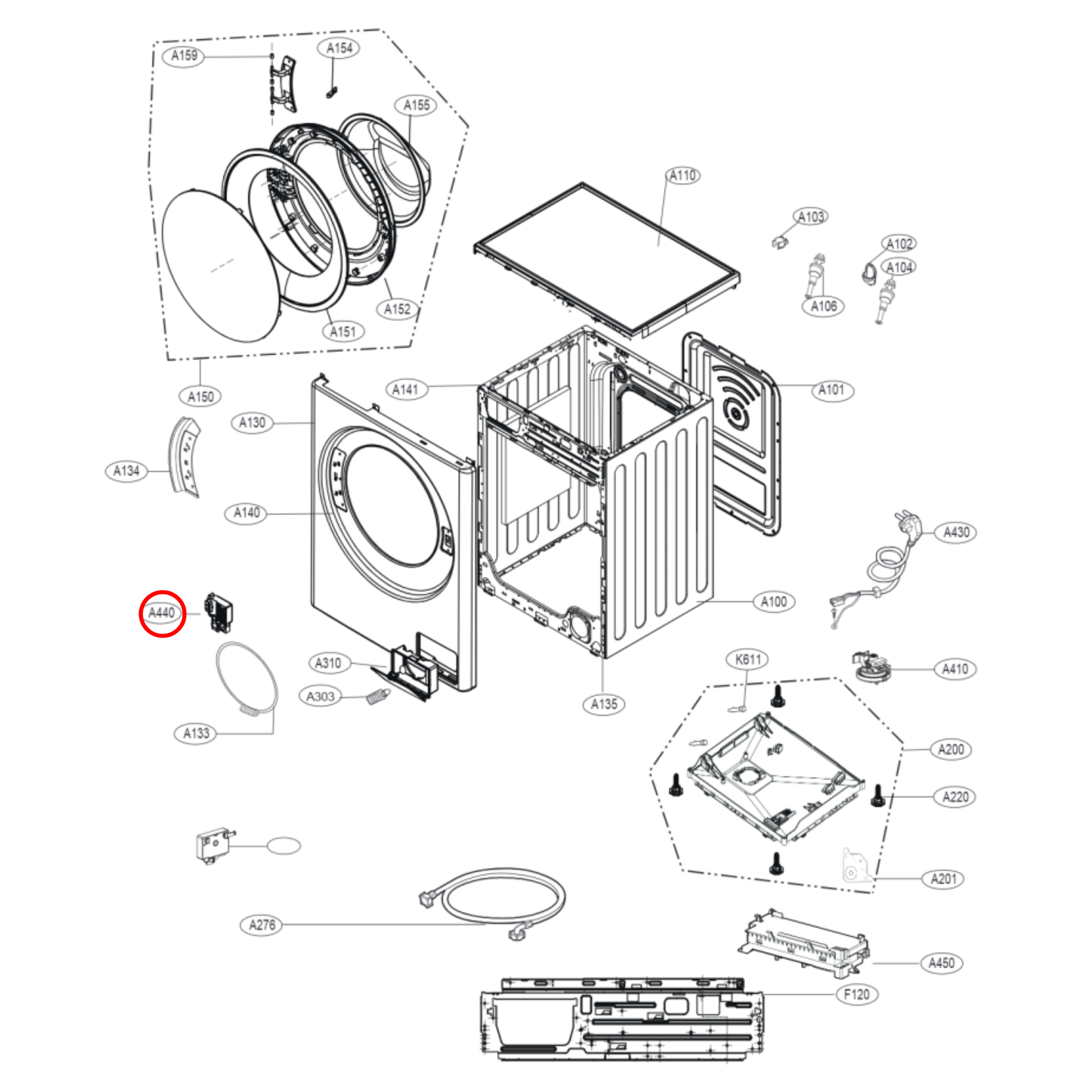
If the door locks repeatedly without cause, the hardware may be failing. Most lock issues are solvable at home, but sometimes the door lock assembly needs replacement.
Identify Bad Door Lock
Signs of a defective lock include no click when cycle ends, door stays locked even when dry and powered off, CL error persists after resets, or visible damage or resistance when opening. To replace, find your model number on the door rim or back. Order a genuine LG door lock assembly. Unplug the washer, remove the top panel, disconnect the lock wires, and swap it out.
When to Call LG Support
Contact a certified technician if the drain pump does not run after cleaning the filter, CL blinks continuously and will not reset, you suspect a control board or wiring issue, or you are uncomfortable with manual drainage or disassembly. Repairs under warranty should always be handled professionally.
Frequently Asked Questions About Unlocking LG Washing Machines
Why will my LG washing machine door not open?
The door stays locked for safety reasons. Common causes include water in the drum, high internal temperature after a hot wash, an active cycle, a power interruption, or the Child Lock (CL) being enabled. Check these conditions before attempting troubleshooting.
How long does an LG washer stay locked after a cycle ends?
If the cycle involved hot water, the thermal lock keeps the door locked for 2 to 5 minutes while the drum cools. You will hear a click when it unlocks. Do not force the door during this time.
How do I turn off Child Lock on my LG washer?
Press and hold Delay End plus Add Item for 3 seconds. The display should change from CL to normal. Some models use Option plus Spin or Temp plus Rinse. Look for buttons with a lock icon.
Can I manually drain my LG front-load washer?
Yes. Unplug the machine, open the lower front access panel, pull the emergency drain hose, remove the cap, and let water flow into a pan. Then clean the filter and reassemble. This is necessary if the machine will not power on or drain automatically.
What should I do if my LG washer is stuck after a power outage?
Wait 5 minutes for the safety timer to release the lock. If power was out longer, plug the machine back in and try opening the door. If water remains inside, run a Drain and Spin cycle to remove it.
When should I call a professional for a locked LG washer?
Call a technician if CL blinks continuously and will not reset, the drain pump does not work after filter cleaning, you suspect a control board failure, or the door lock assembly is clearly defective and needs replacement.
Key Takeaways for Unlocking Your LG Washing Machine
Most LG washing machine lock issues are solvable at home without professional help. Start with the simplest solutions first. Wait 2 to 5 minutes if the cycle just ended, as the thermal lock releases automatically when the drum cools. Check for water in the drum and run a Drain and Spin cycle or manually drain via the pump filter if needed. Disable Child Lock using the correct button combination for your model. Perform a hard power reset by unplugging for 3 to 5 minutes to clear electronic glitches.
Use mechanical methods only as a last resort. The firm tap, plastic card, and wire loop techniques can free a stuck door but may damage the lock if used repeatedly. If the door locks repeatedly without cause, the door lock assembly likely needs replacement. Clean the filter monthly, use HE detergent, and avoid opening the door mid-cycle to prevent future lock issues. If the problem persists after trying all these steps, contact a certified LG technician for professional diagnosis and repair.



