
Your Electrolux washing machine won’t open after the cycle ends. You press the door, check the display, wait a few minutes, and still nothing. This is a common issue that frustrates thousands of users every year. Whether the door lock is stuck due to a thermal delay or the control panel is frozen by an accidental Child Lock activation, unlocking your Electrolux washer is often a simple fix once you know the correct method. This guide provides step-by-step instructions to unlock your Electrolux washing machine safely, covering all models, error codes, and emergency release techniques.
You’ll learn to identify whether the problem is a door lock or control lock, try the correct button combinations for your specific model, and access emergency release methods if needed. Every solution is based on official technical documentation and real-world troubleshooting experience.
Identify the Lock Type First
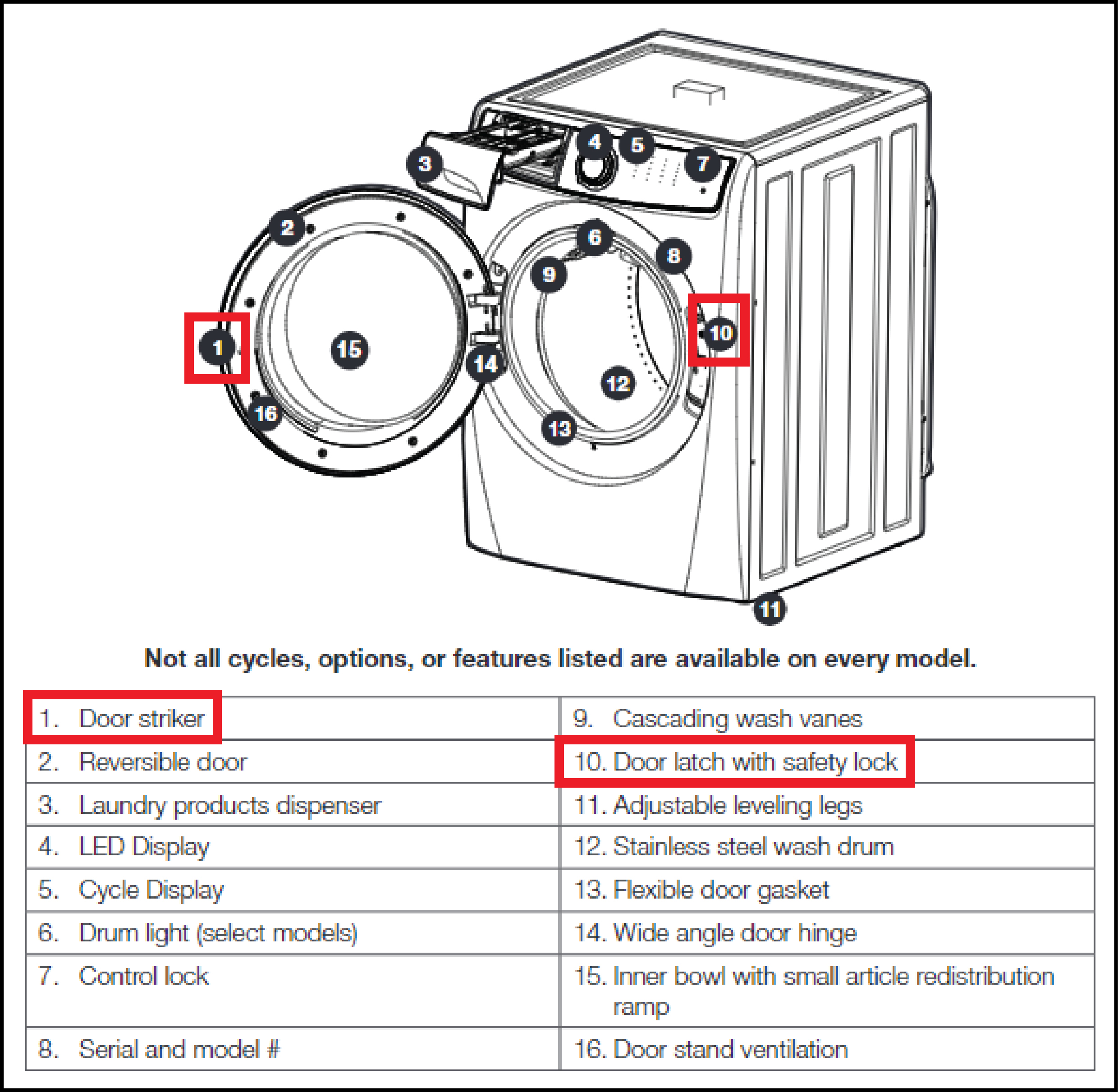
Before attempting any fixes, determine what kind of lock is preventing access. Electrolux machines use two distinct locking systems, and using the wrong method wastes time and risks damage.
Door Lock: Physical Door Won’t Open
The door handle refuses to move with no clicking sound, even though the cycle has finished. The drum is visible through the glass but remains inaccessible. This lock engages automatically during and after a wash cycle, especially when hot water is present. Common causes include the thermal cooling delay, water still in the drum, mechanical failure, or error codes like E11 or E42.
Control Lock: Buttons Don’t Respond
A padlock icon appears on the display, and touch buttons become completely unresponsive. On models like the EWF-1674BR, an orange light indicates active Control Lock. The door may physically open if no water is present, but you cannot start or adjust any cycles. This usually results from accidentally holding button combinations or a software glitch.
Pro Tip: If the display is active but buttons do not work, the Control Lock is active. If the door won’t budge but the display is normal, the door lock mechanism is the issue.
Wait for Thermal Delay to Release
Most locked-door situations are not malfunctions. Electrolux washers use a bimetal strip in the door lock that heats to engage during the cycle and cools to release afterward. This safety feature prevents opening when water is hot or the drum is still moving.
Wait 3 to 5 minutes after the cycle completes. For hot cycles at 60°C or higher, wait up to 15 to 30 minutes. Listen for a distinct clicking sound, which indicates the lock has released.
Warning: Forcing the door before the thermal delay ends can break the latch or damage the door seal. Patience prevents costly repairs.
Power Cycle the Machine
A frozen control board can prevent unlock signals from sending properly. Resetting clears temporary faults and often resolves the issue completely.
Reset Procedure
Turn off the machine using the On/Off button. Unplug the washing machine from the wall outlet. Wait 30 seconds, or 5 minutes for stubborn issues. Plug the machine back in and turn it on. Attempt to open the door or check if the Control Lock icon has disappeared.
This simple reset resolves most temporary control board errors and should be your first troubleshooting step when the door won’t unlock or the control panel is frozen.
Drain Water Before Attempting Unlock
Electrolux machines lock the door when water is detected inside the drum. This safety feature prevents flooding from water spilling out. Never force the door open if water is visible.
How to Check for Water
Look through the door glass. If water is visible, the lock is intentional and necessary. Error code E11 or a flashing “E” followed by “11” confirms drainage issues keeping the door locked.
Fix Water Lock Issues
Run a Spin Only or Rinse and Spin cycle to pump out remaining water. If the machine is unresponsive, perform an emergency drain through the filter access panel. Once the drum is empty, the door should unlock. Clear the drain filter if E11 persists, as clogs are the primary cause of this issue.
Disable Control Lock by Model
Different Electrolux models use unique button combinations to toggle the Control Lock. Ensure the machine is powered on before attempting these sequences.
Easy Iron Button Method
This method works on most standard Electrolux front loaders including EWF and EWG models. Turn on the machine. Press and hold the Easy Iron button for at least 3 seconds. The lock symbol disappears from the display, confirming the Control Lock is disabled.
Temperature Plus Spin Reduction Hold
This combo works on models like the EWF-1674BR and EWF-1474BR. Power on the machine. Look for an orange light next to the lock icon, which indicates active lock. Press and hold the Temperature and Spin Reduction buttons simultaneously. Hold until you hear a distinct beep. The orange light turns off when the lock is disabled.
Note: This same combination toggles the lock on and off, and the setting persists even after the machine is turned off.
Options Plus Set Method
This applies to LuxCare digital models and the EFLS527UIW. Press and hold the Options and Set buttons simultaneously for 15 seconds. The padlock light should extinguish.
Alternatively, press Power to turn on the machine. Use the Menu or Options button to scroll to Control Lock on the screen. Press Select or Set to disable it. The padlock icon disappears from the display.
Some models require pressing Options repeatedly until the lock LED activates, then pressing Set to toggle it off.
Start/Pause Long-Press
If the Control Lock was activated by accidentally holding Start/Pause, try holding the same button for 3 to 5 seconds to deactivate it. This works on older models but is less reliable on newer digital panels.
Emergency Door Unlock Methods
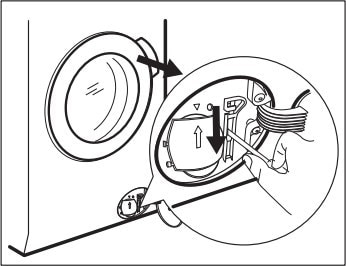
Use these methods only after standard troubleshooting has failed and the thermal delay has passed. Always unplug the machine before accessing internal components.
Filter Flap Emergency Release
Most Electrolux front loaders have an emergency release near the bottom filter. Unplug the machine first. Open the filter flap at the bottom front of the appliance. Locate the emergency pull tab next to the drain filter. Pull the tab down once, then pull down and hold it in the tensed position. While holding, gently pull the door open.
Critical: If the drum is full of water, drain it first via the filter or pump hose to avoid flooding your laundry room.
Internal Latch Release
Some models like the EWC1350 have a manual release accessible through the door gap. Find the small gap at the bottom edge of the closed door. Insert a thin tool like a flathead screwdriver or your finger into the gap. Slide inside toward the back of the lock mechanism. Feel for a small release button underneath the door lock. Press and hold this button while pulling the door handle. The door should open.
Front Panel Disassembly for Error E42
When the door latch fails completely and no external release works, partial disassembly is required. This procedure addresses Error E42, which indicates door lock failure.
Gather a Phillips screwdriver and flathead screwdriver. Unplug the machine. Remove the top panel by unscrewing the two Phillips screws at the rear edge, sliding the panel backward, and lifting it off. Remove the front panel screws from the top edge, both vertical sides, and the bottom edge. Gently pull the front panel backward, being careful of pop rivets. Lift the panel away once loose.
Locate the door latch assembly behind the front panel. Plug the machine back in with panels removed. Have someone press and hold the Start button for 3 to 5 seconds while you manipulate the manual release tab on the latch. The door should disengage.
After opening, inspect the latch for cracks or wear. Replace the door latch assembly if damaged to prevent Error E42 from returning.
Understand Error Codes

Error codes explain why the machine remains locked and guide your next steps.
| Error Code | Meaning | Unlock Action |
|---|---|---|
| E11 | Drain issue, water present | Drain water, clean filter, run spin |
| E42 | Door lock mechanical failure | Manual release, replace latch |
| Padlock Icon | Control Lock active | Use model-specific button combo |
| Flashing E11 | Control fault | Reset, power cycle, check wiring |
Error E42 almost always requires latch replacement after manual unlock. Address the underlying cause to prevent recurrence.
Follow Critical Safety Warnings
Protect yourself and your appliance by following these essential guidelines.
Wait for cooling after hot washes to avoid scalding. Never force the door if the drum is spinning or full of water. Always unplug the machine before accessing internal parts. Drain water first rather than bypassing flood protection. Work gently when removing panels to avoid breaking clips or pop rivets.
Warning: Bypassing safety systems may void your warranty and risk additional appliance damage. Professional repair is recommended if you’re uncertain about any step.
When to Call a Professional Technician
Contact a technician if the door remains locked with no water in the drum after completing all reset and emergency procedures. Seek professional help if Error E42 returns after replacing the door latch. Also call if the control board shows no signs of life or if you’re uncomfortable with disassembly.
Typical professional repairs include door lock assembly replacement costing $40 to $80 for parts plus labor. Technicians can test the door switch with a multimeter to check continuity and identify faulty sensors requiring replacement.
Quick Unlock Checklist

Use this checklist to resolve your lock issue systematically.
Wait 5 to 30 minutes after the cycle ends. Check for water in the drum and drain if present. Look for the padlock icon on the display. Try Easy Iron hold, Temp plus Spin hold, or Options plus Set depending on your model. Power cycle by unplugging for 30 seconds. Use the filter flap pull tab for emergency release. Access the internal latch release as a last resort. Call service if Error E42 persists after repairs.
Frequently Asked Questions About Unlocking Electrolux Washing Machines
Why won’t my Electrolux washing machine door open after the cycle ends?
The most common reason is the thermal delay. The door lock uses a bimetal strip that needs time to cool down after a wash cycle, especially with hot water. Wait 3 to 5 minutes, or up to 30 minutes for hot cycles. If water is visible in the drum, the door intentionally stays locked to prevent flooding.
How do I turn off the Control Lock on my Electrolux washer?
The method depends on your model. Most models respond to holding the Easy Iron button for 3 seconds. Models like EWF-1674BR require holding Temperature and Spin Reduction buttons together until you hear a beep. LuxCare models use Options plus Set held for 15 seconds. Check your display for the padlock icon to confirm the lock is active.
What does Error E42 mean on my Electrolux washing machine?
Error E42 indicates a door lock failure, either mechanical or electrical. The lock may be clicking but not engaging properly, or engaging but refusing to release. You’ll need to use the emergency filter flap release or front panel disassembly to open the door, then replace the door latch assembly to fix the error.
Can I force the door open if my Electrolux washer is locked?
No, forcing the door open is not recommended. If water is present, you’ll cause flooding. If the drum is hot, you risk burns. Forcing the door can also damage the latch mechanism and door seal, leading to costly repairs. Follow the proper troubleshooting sequence instead.
How do I perform an emergency drain on my Electrolux washing machine?
Locate the filter flap at the bottom front of the machine. Place a shallow pan beneath it. Open the flap and slowly turn the drain filter counterclockwise to release water. Have towels ready as water will flow out. Once drained, you can attempt to open the door or proceed with further troubleshooting.
Key Takeaways for Unlocking Your Electrolux Washing Machine
Unlocking your Electrolux washing machine is usually straightforward when you follow the right steps in order. Start by identifying whether you dealing with a door lock or Control Lock issue, then wait for the thermal delay, try a power cycle, and use the appropriate button combination for your model. Emergency release methods like the filter flap pull tab exist for situations where standard approaches fail, and these should only be used after ensuring the drum is empty and the machine is unplugged.
Most lock issues resolve with patience and the correct button combo. Error codes like E11 and E42 point to specific problems that need attention beyond simple unlocking. Save this guide for future reference, and you’ll be able to handle any Electrolux washing machine lock situation confidently.



