Is your LG front load washing machine touch panel unresponsive? This frustrating issue affects many LG washer owners, leaving them unable to start cycles or adjust settings. The problem can range from a simple Control Lock setting to serious hardware damage caused by moisture infiltration. Understanding the root cause is essential before spending money on unnecessary repairs.
This guide walks you through every diagnostic step, from checking simple settings to inspecting internal components like the control board and touch gasket. You’ll learn how to identify software glitches versus hardware failure, test components safely, and determine whether DIY repair is feasible or professional help is needed.
Control Lock: Most Common Cause

The Control Lock feature is the number one reason LG washer touch panels appear dead. When enabled, this function displays “CL” on your screen and disables all buttons except the power button. The feature prevents accidental changes during cycles and remains active even after the machine is unplugged and restarted.
How to Disable Control Lock
Locate the button on your model marked with a key icon or “Child Lock” label. Press and hold this button for exactly 3 seconds until you hear a beep. The “CL” indicator will disappear, and all touch buttons should resume normal function.
Warning: Attempting to press other buttons while Control Lock is active will yield no response. Always check for the “CL” symbol before assuming hardware failure.
Factory Reset to Clear Glitches
Software freezes can mimic hardware problems exactly. A proper factory reset clears residual power from the logic board and often restores touch functionality without any parts replacement.
Perform a Full Reset
Unplug the washer or turn off the circuit breaker. While the machine is completely powered down, press and hold the Start/Pause button for 5 seconds. This drains stored electricity from the control board. Restore power and turn the machine on normally.
Note: Some models benefit from a 5-minute wait after unplugging before performing the reset. If the panel remains unresponsive after this procedure, the issue is hardware-related.
Power and Display Check
A completely dead display with no lights or sounds indicates a power supply problem rather than a touch panel issue. Before opening the machine, verify that electricity is reaching the unit properly.
Test the Outlet and Cord
Use a multimeter to confirm proper voltage (230V in most regions) at the wall outlet. Inspect the power cord for visible damage or fraying. If voltage is present at the outlet but the washer shows no signs of life, the fault lies within the machine’s internal electrical system.
Key Insight: A weak or fluctuating power supply can prevent the touch panel from initializing, even when the machine appears to be plugged in correctly.
Inspect for Moisture and Carbon Tracking
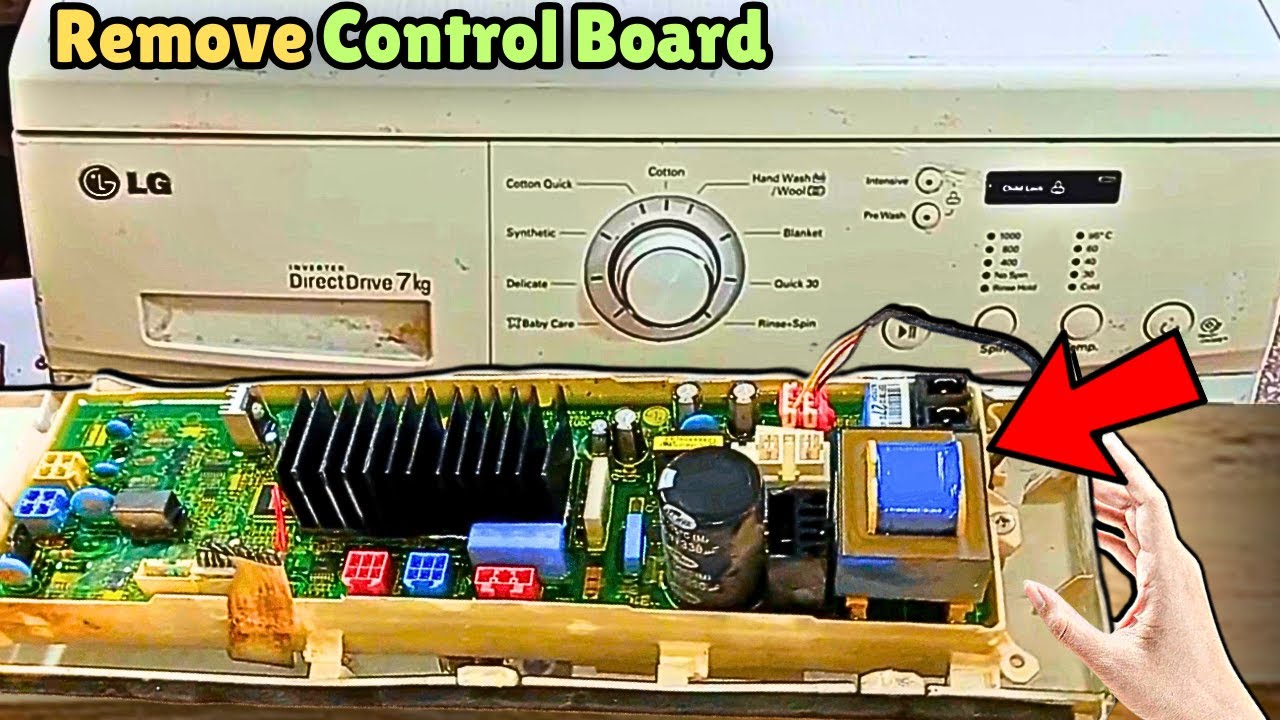
Water damage is the leading cause of permanent touch panel failure in LG front load washers. Moisture that seeps into the control area creates carbon tracking, a destructive condition where electrical current arcs across wet or corroded circuit traces.
Open the Top Cover Safely
Unplug the machine first. Remove the screws securing the top panel (typically located at the back of the unit). Slide the cover backward and lift it off to expose the main control board behind the control panel.
Identify Carbon Tracking
Look for dark, burnt-looking lines on the circuit board traces. Check for discoloration around the touch panel connector. Visible moisture or white residue indicates water exposure has occurred.
Pro Tip: Carbon tracking often appears alongside a damaged touch gasket. Replace both components to prevent the problem from recurring.
Test the Touch Gasket Separately

The touch gasket (or membrane) is the flexible layer that transmits your finger’s touch to the control board. This component can fail independently of the board itself.
Isolate the Gasket Function
Reconnect the control board harness with power off. Apply temporary power and press each conductive spring directly with your finger. These springs are the rubber nubs located under the touch panel that make contact when you press buttons.
If the machine responds when you press these springs directly, the gasket is likely faulty. If there is no response, the control board is the problem.
Warning: Never use metal objects to test the springs. Use only clean fingers or non-conductive tools to avoid short circuits.
Check Wiring and Connections
Loose or corroded wiring between the touch panel and main control board frequently causes intermittent or complete touch failure. This is one of the most overlooked diagnostic steps.
Inspect the Harness
Examine the ribbon cable and connector between the panel and board. Ensure it is fully seated with no bent pins. Look for signs of corrosion, detergent residue, or moisture damage. Disconnect and reconnect all related plugs to ensure proper contact.
Common Mistake: Assuming the control board is bad without first checking connection integrity. A loose harness is often the culprit.
Clean the Touch Surface
Detergent buildup, hard water residue, or debris on the touch panel can interfere with capacitive sensing, causing delayed or missed touches that users mistake for hardware failure.
Safe Cleaning Method
Dampen a microfiber cloth with water. Wipe the touch surface gently in circular motions. Dry thoroughly with a clean cloth before using the machine.
Fact: A dirty panel is a frequent cause of touch problems. Regular cleaning prevents this common issue.
Diagnose the “Attached Panel” Lockup
A unique failure mode occurs when the washer works perfectly with the touch panel removed but locks up completely when the panel is attached. This confusing scenario helps narrow down the exact cause.
What This Means
If you can operate the machine by pressing the internal springs directly but the machine freezes when you snap the panel into place, the control board is sending or receiving unwanted signals. The panel overlay may be creating an electrical path that overwhelms the capacitive sensor.
Expert Note: This problem usually indicates a fault in the control board’s sensitivity circuit rather than an issue with the panel itself. The board fails to distinguish between valid touch input and interference.
Replace the Control Board if Panel Causes Lockup

When the touch panel attachment triggers a freeze, the control board is almost always the root cause. The board’s capacitive sensing circuit has failed and cannot process inputs correctly.
Recommended Replacement
Use part number EBR86498812 (PD00082299) for the Main Control Board Assembly. Replace the board even if it appears clean because internal circuit degradation may not be visible externally.
DIY Tip: Order the replacement board with the touch gasket pre-installed if available. This reduces alignment errors during installation.
Dual Replacement Strategy for Water Damage

If your inspection reveals carbon tracking or moisture damage, you must replace both the control board and the touch gasket. Replacing only one component typically results in rapid re-failure.
Why Both Components?
Moisture damages both components simultaneously. A compromised gasket can cause repeated arcing that destroys a new board. The damage that ruined the original board likely also compromised the gasket’s conductivity.
Installation Best Practices
Align the new gasket carefully with the panel frame, ensuring all buttons seat properly. Secure all connections tightly and double-check harness plugs. Reassemble with original seals intact to prevent future water ingress. Test all functions with a spin cycle after completion.
Pro Advice: Wear an anti-static wrist strap when handling new control boards to prevent electrostatic damage.
Fix Specific Button Failures
When only one button (such as Start) fails while others work normally, the problem is localized to that specific area.
Possible Causes
The touch gasket section corresponding to that button may be damaged. A trace on the control board could be broken. Debris may be blocking the capacitive response in that spot.
Solutions
Clean the affected area thoroughly first. Try replacing only the touch gasket if the rest of the panel functions normally. If the problem persists, replace the control board for a permanent fix.
Reality Check: LG does not offer individual button repairs. Full gasket or board replacement is the only viable solution.
Prevent Future Touch Panel Failures
Prevention is essential since moisture is the primary enemy of touch panel electronics.
Keep the Panel Dry
Wipe down the control area after heavy use. Avoid spraying cleaners directly onto the panel. Ensure the laundry room has adequate ventilation to reduce humidity.
Regular Maintenance
Clean the touch surface monthly with a microfiber cloth. Perform a power cycle (unplug for 5 minutes) if responsiveness decreases. Inspect regularly for water leaks near the door or detergent dispenser that could wick upward into the control area.
Critical Tip: If water ever gets behind the panel, disconnect power immediately and inspect. Early action can save the control board from permanent damage.
When to Call a Technician
While many touch panel issues are DIY-fixable, some situations require professional assistance.
Call for Help If
You are uncomfortable working with electrical components. Carbon tracking is severe and you are unsure about part compatibility. The problem returns after replacement. You need help diagnosing the attached panel lockup phenomenon.
A certified technician can test board continuity, verify voltage, and ensure safe reassembly.
Frequently Asked Questions About LG Front Load Washing Machine Touch Panel Issues
Why does my LG washer say “CL” and not respond to any buttons?
The “CL” code indicates Control Lock is enabled. This feature disables all touch inputs except the power button. Press and hold the button with the key icon for 3 seconds to unlock it. You will hear a beep confirming deactivation.
Can a power outage cause the touch panel to stop working?
Yes, power outages or voltage fluctuations can cause software freezes that make the touch panel unresponsive. Unplug the washer and hold the Start/Pause button for 5 seconds to perform a factory reset that often restores functionality.
How do I know if my control board is damaged by water?
Remove the top panel and inspect the control board for dark, burnt-looking lines (carbon tracking) or discoloration around the touch panel connector. Visible moisture or residue also indicates water damage. In these cases, the board cannot be repaired and must be replaced.
Should I replace just the touch panel or the entire control board?
If water damage is present, replace both the control board and touch gasket. If only the touch panel fails (panel causes lockup when attached), the control board is typically the root cause and should be replaced.
How much does it cost to repair an LG washer touch panel?
Control board replacement typically costs between $150 and $300 for the part, plus labor if professional installation is chosen. Touch gasket replacement is usually less expensive. Simple fixes like disabling Control Lock or cleaning the panel cost nothing.
Key Takeaways for Fixing Your LG Washer Touch Panel
The LG front load washing machine touch panel not working issue is solvable in most cases. Always start with simple checks before assuming hardware failure. Verify that Control Lock is not enabled and try a factory reset before opening the machine. These two steps resolve the majority of reported issues.
If hardware damage is found, replace both the control board and touch gasket to prevent rapid re-failure. Moisture damage affects both components, and replacing only one typically leads to repeat problems. Use part EBR86498812 for the control board replacement.
Regular maintenance keeps touch panels working longer. Keep the control area dry, clean the surface monthly, and address any water leaks immediately. With proper care and the right diagnostic approach, you can restore full functionality to your LG washer and extend its service life.