
You’ve just purchased or inherited a Midea washing machine, and the control panel looks like a spaceship cockpit. Whether you own a top-load or front-load model, understanding how to operate Midea washing machine properly means cleaner clothes, lower energy bills, and a machine that lasts years longer. This guide covers every essential function: powering on, loading laundry, selecting cycles, troubleshooting errors, and performing monthly maintenance that keeps your washer running like new.
No technical jargon. No confusion. Just clear, step-by-step instructions that transform you into a confident Midea washer operator in under 10 minutes of reading.
Power Up the Machine Correctly
Before any wash cycle begins, your Midea washer must be properly initialized. This foundational step activates the control system and prepares all components for operation.
Confirm Power Connection
Ensure the machine is plugged into a grounded wall outlet with stable voltage. A weak or unstable power supply may prevent startup entirely or cause error codes during operation. Check that the outlet works by testing it with another device first.
Press the Power Button
Locate the Power button on the control panel and press it firmly to activate the system.
• Front-load models: The digital display lights up or the rotary dial becomes responsive
• Top-load smart models: The screen activates, showing default settings or time remaining from the previous cycle
A small indicator light will illuminate, confirming the unit is receiving power and ready for input. Never bypass the power button. Even if the display seems active, pressing Power ensures full system initialization, especially after power outages.
Load Laundry the Right Way
Proper loading prevents imbalance, reduces wear on internal components, and improves cleaning performance. The method differs slightly between top-load and front-load models.
Top-Load: Open Lid and Distribute Evenly
Lift the lid and place clothes loosely around the agitator or impeller.
• Avoid over-packing. Leave approximately four inches of space below the top of the drum
• Mix fabric types and sizes to maintain balance during spin cycles
• Heavy items like towels and jeans should be spaced out, never grouped together
Overloading causes loud vibrations, poor spin performance, and can trigger E4 (Motor Overload) error codes.
Front-Load: Load Through the Door
Open the front door and load clothes horizontally into the drum.
• Do not block the rubber door seal with fabric
• Fill only up to three-quarters full. Clothes need room to tumble freely
• Never force the door shut. If resistance occurs, remove a few items and try again
Leave the door slightly ajar after unloading to dry the rubber gasket and prevent mold buildup.
Add Detergent and Fabric Softener
Using the correct amount and type of detergent prevents residue buildup, optimizes cleaning, and protects your machine from damage.
Use the Detergent Drawer
Pull out the drawer gently. Most Midea models feature a two-compartment design.
• Right compartment (Main Wash): Add liquid or powder detergent here
• Left compartment (Fabric Softener): Add softener only if desired. Do not overfill
• Some models include a pre-wash section marked with “I” or “P”. Use only for heavily soiled clothes
Use half the recommended cap amount for small loads and the full cap for large, heavily soiled loads.
Close the Drawer Securely
Push the drawer back until it clicks into place. A loose drawer can leak detergent or fail to dispense it during the wash cycle. Never pour detergent directly into the drum unless your specific model specifies this method, as it can cause clumping and staining.
Select the Right Wash Cycle

Choosing the correct cycle ensures effective cleaning and fabric care. Midea offers several preset programs tailored to different needs.
Common Cycle Options
Use the dial or touch buttons to select from these standard programs.
• Heavy Duty: For muddy or greasy clothes. Features longer wash time with hot water option
• Normal Wash: Ideal for everyday wear like shirts, pants, and undergarments
• Quick Wash: Cleans lightly soiled clothes in under 30 minutes
• Delicate Wash: Gentle on silks, lingerie, and lace. Uses low spin speed
• Soak: Soaks clothes before washing to loosen set-in stains
A Cold water, High spin Heavy Duty cycle takes approximately 77 minutes on most top-load smart models.
Customize Settings for Better Results
Fine-tune your cycle using these adjustable parameters.
Set Water Temperature
• Cold: Best for darks and energy savings
• Warm: Standard setting for most mixed loads
• Hot: Use for whites and sanitizing. Always check garment labels first
Hot water isn’t available on all models. Verify your model’s capabilities before selecting.
Adjust Spin Speed
• High: Removes maximum moisture. Ideal for towels and cottons
• Low/Medium: Protects delicates, knits, and synthetic fabrics
Control Water Level
Some models allow manual water level selection.
• Low: For small loads
• Medium: For average loads
• High: For bulky items like bedding
Auto-sensing models adjust water automatically based on load weight. No manual input needed.
Enable Extra Options
• Extra Rinse: Adds a second rinse cycle. Recommended for sensitive skin or when using heavy detergent
• Soil Level: Choose Light, Medium, or Heavy to adjust wash intensity based on how dirty the clothes are
Start the Wash Cycle
Once all settings are configured, begin the cycle with confidence.
Press Start/Pause
Locate the Start or Start/Pause button and press it to begin.
• The lid or door locks automatically for safety
• The display shows remaining time and current phase (filling, washing, rinsing, spinning)
Do not attempt to open the door during the cycle. The lock prevents access until water drains and the drum comes to a complete stop.
Monitor Cycle Progress
The digital display updates in real time throughout the cycle.
• Countdown timer shows minutes remaining
• Phase indicators (Filling, Wash, Rinse, Spin) help track progress
If you need to pause the cycle, press Start/Pause again. Wait for the lock to disengage before opening the door or lid.
Understand Each Cycle Phase
Knowing what happens during each phase helps diagnose issues and appreciate your machine’s efficiency.
Filling Phase
Water enters the drum based on load weight and selected level. Detergent dissolves and disperses throughout the water. If no water flows, check household supply, inlet hoses, and look for E1 error codes.
Agitation or Tumbling
• Top-load models: Agitator or impeller moves clothes through water
• Front-load models: Drum rotates back and forth to clean fabrics
This phase loosens dirt and stains effectively.
Draining and Rinsing
Dirty water pumps out completely. Fresh water refills for rinsing. Some models perform multiple rinses automatically. The Extra Rinse option activates additional rinse cycles here, which proves useful in hard water areas.
High-Speed Spin
The drum spins rapidly to extract moisture.
• Higher spin speed means less drying time
• Unbalanced loads may cause shaking or trigger E4 error codes
Cycle Completion
The machine beeps or displays “End.” The door or lid unlocks automatically. Remove clothes within 30 minutes to avoid wrinkles and odors.
Handle Errors and Alerts
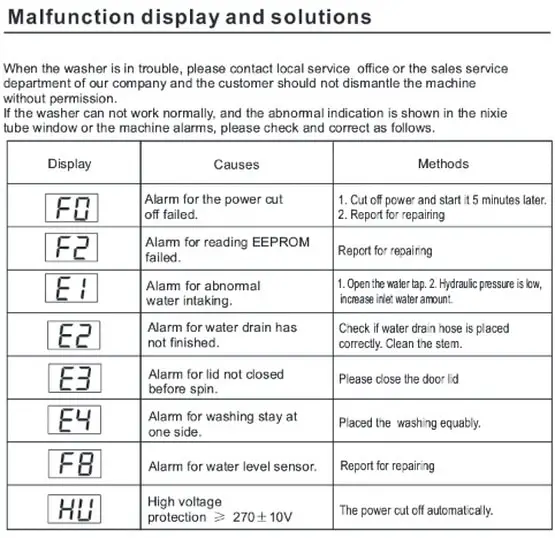
Even well-maintained machines occasionally display error codes. Here’s how to respond when they appear.
Common Error Codes
• E1: No water filling. Check inlet valves and household water pressure
• E2: Drain issue. Clean pump filter or unclog drain hose
• E3: Lid or door won’t lock. Inspect latch and alignment
• E4: Motor overload. Reduce load size and redistribute clothes evenly
• E5: Temperature sensor error. Check thermistor and wiring
• E6: Water level error. Check pressure hose for kinks or blockages
• E7: Communication error. Control board or sensor failure
Power off the machine, wait one minute, and restart. Many error codes clear after a simple reset.
Use Diagnostic Mode for Testing
For persistent issues, run built-in diagnostic tests.
Enter Diagnostic Mode
- Press Power to turn the machine OFF
- Within 5 seconds, press and hold Power, Soak, and Extra Rinse simultaneously
- Hold until all lights flash and the display activates
Timing is critical. You have 5 to 6 seconds to act after powering off.
Run Component Tests
• Forced Agitation Test: Press Soil Level. Drum runs for 3 minutes. Tests motor, belt, lid lock
• Spin Test: Press Temp. Spins at target RPM for approximately 3 minutes. Tests spin motor and capacitor
• Inlet Test: Press Fabric Softener. Drum fills with mixed hot and cold water. Verifies inlet valves
• Auto-Sensing Test: Press Delay Start. Checks pressure switch and water level sensor
Test runs fully without error indicate the component is functioning properly. If errors persist, the faulty component requires replacement.
Maintain Your Machine Monthly
Regular upkeep prevents breakdowns and keeps your washer performing at peak level.
Clean the Detergent Drawer
Remove the drawer and rinse under warm water. Scrub compartments with a soft brush to remove residue. Perform this every 2 to 4 weeks depending on usage frequency.
Wipe the Door Seal (Front-Load)
Pull back the rubber gasket and wipe away moisture, lint, and mold. Use a damp cloth with vinegar or mild cleaner. Never use abrasive materials.
Clear the Drain Pump Filter
Locate the filter, usually behind the bottom front panel.
- Place a towel underneath to catch water
- Unscrew the cap slowly. Water may spill
- Remove debris such as coins, hair, and fabric fragments
- Reinstall securely
Ignoring this maintenance causes E2 errors and potential flooding.
Flush Inlet Filters
Shut off water valves. Disconnect hoses and clean mesh screens at the washer’s inlet ports. Slow fill times or E1 errors indicate filters need cleaning.
Prevent Common Issues
Avoid problems before they start with these smart habits.
Balance Every Load
Mix large and small items together. Never wash a single blanket or pair of jeans alone. Balanced loads result in smoother spins, less vibration, and longer motor life.
Don’t Overuse Detergent
Excess suds reduce cleaning effectiveness and leave residue inside the drum and components. Use HE detergent only in high-efficiency models.
Ventilate After Use
Leave front-load door ajar when not in use. Let air circulate to dry the drum and rubber seal. This prevents mold, mildew, and foul odors.
Check Hoses Annually
Inspect inlet and drain hoses for cracks, bulges, or leaks. Replace every 5 years or at the first sign of wear.
Frequently Asked Questions About Operating Midea Washing Machines
How do I start a wash cycle on my Midea washing machine?
Press the Power button to activate the machine, then select your desired cycle using the dial or touch panel. Adjust temperature, spin speed, and any extra options as needed. Finally, press Start/Pause to begin the cycle.
What does the E4 error code mean on my Midea washer?
E4 indicates motor overload. This typically occurs when the drum is overbalanced or overloaded. Reduce the load size, redistribute clothes evenly, and restart the cycle. If the error persists, there may be a motor or belt issue requiring professional repair.
Can I use regular detergent in my Midea washing machine?
Use HE (high-efficiency) detergent specifically formulated for front-load and high-efficiency washers. Regular detergent creates excess suds that reduce cleaning performance and can damage components over time.
How often should I clean my Midea washing machine?
Clean the detergent drawer every 2 to 4 weeks. Wipe the door seal after every use on front-load models. Check and clean the drain pump filter monthly. Flush inlet filters when fill times slow down.
What is the quickest wash cycle available on Midea washing machines?
The Quick Wash cycle cleans lightly soiled clothes in under 30 minutes. This option works best for garments that need a fast refresh rather than deep cleaning.
Key Takeaways for Operating Your Midea Washing Machine
Mastering how to operate Midea washing machine involves understanding four core areas: proper loading technique, appropriate cycle selection, responding to error codes, and performing regular maintenance. Load laundry loosely with a mix of fabric types for best cleaning and balanced operation. Select cycles based on fabric care labels and soil level, using Heavy Duty for tough stains and Quick Wash for lightly worn items. When error codes appear, start with a simple reset before pursuing repairs. Monthly maintenance including drawer cleaning, seal wiping, and filter clearing prevents most common problems before they develop.
Your Midea washing machine will deliver reliable, efficient performance for years when you follow these operational best practices. For model-specific details not covered in this guide, always consult your user manual.



