
If your Hotpoint washing machine won’t spin, drain, or turn on, you’re not alone. As one of the most reliable entry-level brands in the U.S. appliance market built on the same platform as GE, Hotpoint washers are designed to last. Yet even the toughest machines develop faults over time. The good news is most issues are fixable, often with simple diagnostics and widely available parts.
Whether you’re dealing with an F05 error code, a leaking front-load model, or a top-loader that won’t agitate, this guide gives you the exact steps technicians use to diagnose and repair your unit. You’ll learn how to interpret error codes, troubleshoot no-spin and no-drain problems, replace key components, and prevent future breakdowns.
Decode Hotpoint Error Codes
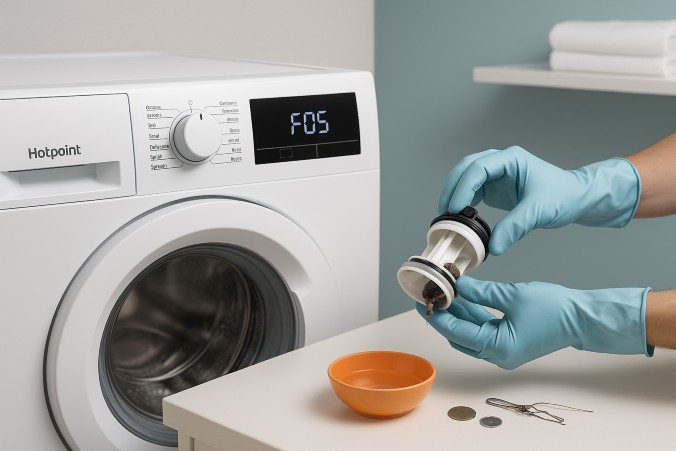
Hotpoint washers use digital error codes to pinpoint failures. These aren’t random. They are diagnostic messages that tell you exactly where to look. Understanding them saves time and avoids unnecessary part replacements.
What Each F-Code Means
Here are the most common error codes you’ll encounter.
• F01: Motor control or triac short circuit. The control board detects a dangerous electrical fault in the motor drive. Unplug for 1 minute to reset. If the code returns, the control board or motor windings are likely damaged.
• F02: Motor speed sensor failure. The machine cannot verify motor RPM. Check wiring harnesses and inspect motor brushes if applicable. Misalignment or a faulty tachometer can trigger this.
• F03: Water level sensor error. Caused by a blocked pressure hose or failed pressure switch. Inspect the thin tube running from the tub to the control panel for kinks or water buildup.
• F04: Fill timeout. Water isn’t entering within 10 minutes. Verify supply valves are open, inlet hoses aren’t kinked, and inlet screens are clean. Test the solenoid valve with a multimeter.
• F05: Drain blockage or pump failure. This is the most common code. Water remains after the cycle. Start by cleaning the drain filter. If the pump hums but does not drain, the impeller is likely jammed.
• F06: Door lock fault. Front-load models won’t start if the door isn’t securely locked. Listen for the click when closing. A broken latch or misaligned striker causes this.
• F07/F08: Heating element or relay issue. The washer stops mid-cycle during hot washes. Try a cold cycle. If it completes, the heater circuit needs replacement.
• F09/F11/F12: Control board communication errors. Indicates failed communication between main board and motor control. Check wiring connections and reset the machine. Persistent codes mean the board must be replaced.
• F13/F15/F18/F19: Motor or sensor faults. Generic signals pointing to motor control, tachometer, or sensor failures. Requires professional multimeter testing.
Pro Tip: If your model displays an unlisted code, photograph the display and model tag. Cross-reference with official service manuals.
Fix a Washer That Won’t Spin
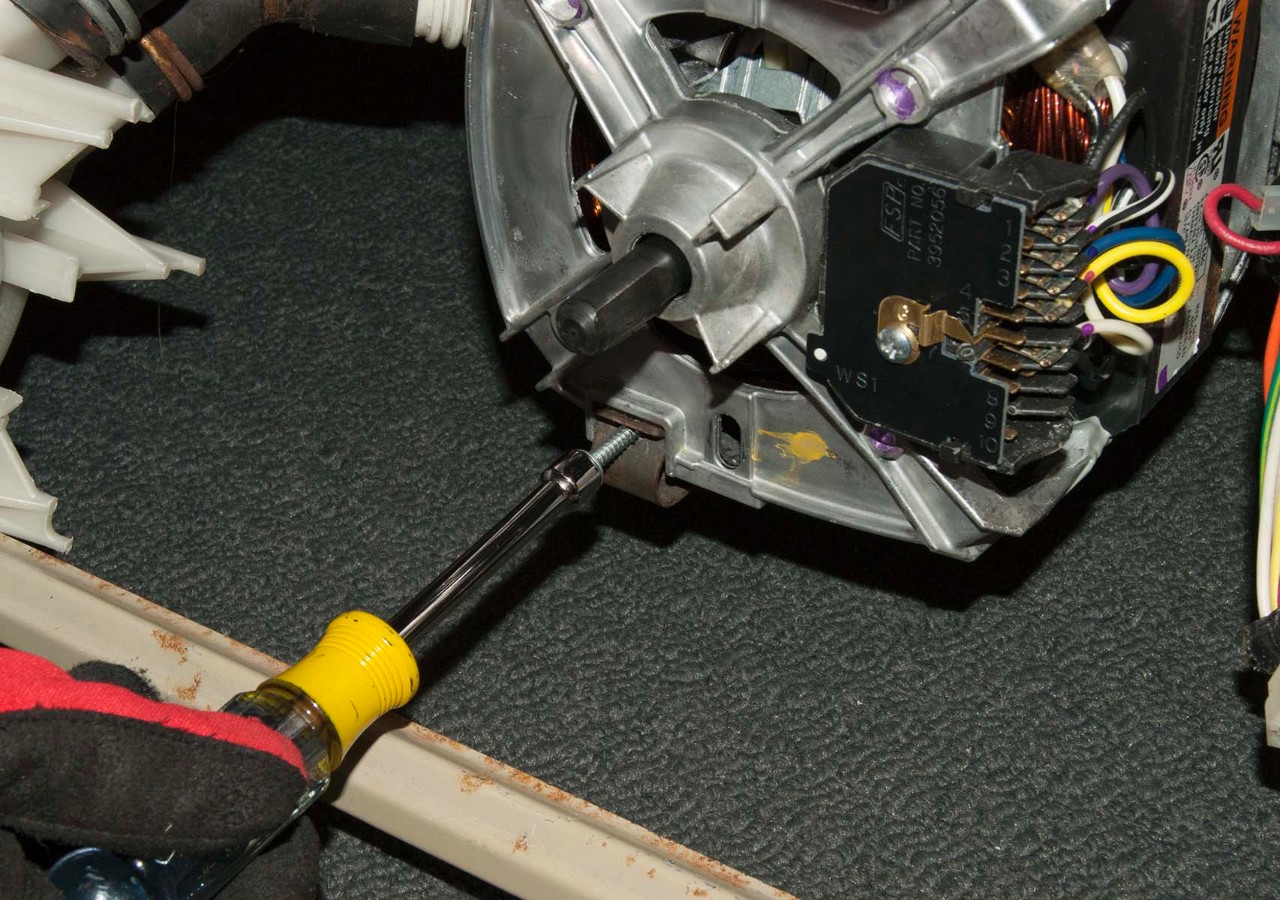
A Hotpoint washer that fills and agitates but won’t spin is a frequent service call. The drum stops at the spin phase, leaving clothes soaked. This is not always a motor problem. It is often safety or drainage related.
Check Drain Completion First
Hotpoint machines will not spin until the tub is empty. If water remains, the spin cycle is disabled.
Action steps.
- Listen for the drain pump running at the end of the wash.
- If no sound, test the pump or check for F05 error.
- If water drains but no spin, move to mechanical checks.
Replace Worn Motor Coupling (Top-Load)
In top-load models, the motor coupling wears out over time. When it fails, the motor spins but the drum does not.
Symptoms include.
• Motor runs, but drum does not agitate or spin.
• Burning smell from friction.
• Loud grinding during cycle start.
Replacement steps.
- Unplug the machine.
- Tip the washer backward or remove the cabinet.
- Disconnect motor and transmission shafts.
- Remove broken coupling pieces.
- Install new coupling (available for under $20).
- Reassemble and test.
Time Estimate: 45 to 60 minutes. No special tools needed.
Test the Lid Switch
A failed lid switch prevents spinning for safety. Even if the lid appears closed, the switch may not engage.
Test method.
- Unplug the washer.
- Open the console or top panel.
- Locate the switch near the lid strike.
- Use a multimeter to check continuity when lid is closed.
- If no continuity, replace the switch ($15 to $25 part).
Warning: Never bypass the lid switch. It is a critical safety feature.
Resolve Drainage Problems
Standing water after the cycle is a red flag. Left unattended, it can cause mold, odors, and floor damage. Drain issues usually stem from clogs or pump failure.
Clean the Drain Filter (F05 Fix)
This is the first step for any drainage problem.
Steps.
- Place towels and a shallow pan under the front lower panel.
- Open the access flap (usually bottom right).
- Slowly unscrew the filter cap. Expect 1 to 2 cups of water.
- Remove debris: coins, hairpins, socks, lint.
- Inspect the impeller inside the pump housing. Spin it by hand. It should turn freely.
Maintenance Tip: Clean every 3 to 6 months to prevent clogs.
Replace a Failed Drain Pump
If the pump hums but does not move water, the impeller is broken. If silent, the motor may be dead.
Replacement process.
- Unplug and shut off water.
- Remove filter access panel.
- Disconnect electrical connector.
- Loosen hose clamps and remove drain hose.
- Unbolt pump from mounting bracket.
- Install new pump (OEM part recommended).
- Reconnect hoses and power.
Part Cost: $70 to $120. Labor adds 1 to 1.5 hours.
Diagnose No Power or Startup Failure
When the washer won’t turn on, the issue could be power, switch, or control board related.
Verify Power Supply
Before opening the machine, check the outlet with another device. Inspect the circuit breaker. Ensure the power cord is not damaged.
Test the Lid or Door Lock
A faulty lock is a common cause of no start behavior.
For top-load: Press the lid firmly. If it starts, the switch is loose. Replace if continuity test fails.
For front-load (F06 code): Listen for the lock click. If absent, the door lock assembly is faulty. Replacement requires accessing the front panel or door boot.
Inspect the Control Board
If power reaches the machine but the display is dead or erratic, the control board may be damaged.
Signs of failure.
• Burn marks on the board.
• Flickering display.
• Multiple error codes.
• Intermittent operation.
Replacement steps.
- Unplug the washer.
- Remove control panel cover.
- Take a photo of all wire connections.
- Disconnect harnesses.
- Unscrew and remove old board.
- Install new board and reconnect.
Expert Note: Always reset the machine after board replacement.
Stop Leaks and Water Damage
Water pooling under the machine points to a leak. Common sources include hoses, seals, and internal components.
Check Inlet and Drain Hoses
Inspect for cracks, bulges, or loose connections. Replace every 5 years, even if they look fine. Use braided stainless steel hoses for durability.
Inspect the Door Boot Seal (Front-Load)
The rubber gasket around the door often fails.
Problems include.
• Mold buildup in folds.
• Tears or punctures.
• Debris trapped in the seal.
Fix: Wipe clean weekly. Replace if torn (cost $40 to $70). Leave door ajar between washes to dry.
Test the Pump Seal
A failing pump can leak from the shaft seal.
Test: Run a drain cycle. Look for drips near the pump. Replace the entire pump if leaking.
Reduce Vibration and Noise
Excessive shaking or loud banging during spin is unsettling and can damage floors.
Level the Machine
An unlevel washer walks across the floor.
Steps.
- Use a bubble level on the top.
- Adjust front feet until balanced.
- Lock jam nuts to secure position.
Tip: Recheck leveling every 6 months.
Balance the Load
Overloading or uneven distribution causes imbalance.
Best practices.
• Mix large and small items.
• Avoid washing single heavy items like rugs.
• Do not exceed the drum’s 3/4 capacity.
Inspect Drum Bearings
If noise persists after leveling, listen for grinding during high-speed spin. Check for drum wobble when rotating by hand. Worn bearings require professional replacement.
Maintain Your Hotpoint Washer
Preventive care extends lifespan and avoids costly repairs.
Monthly Cleaning Routine
- Run an empty hot cycle with 1 cup vinegar or bleach.
- Clean detergent dispenser tray.
- Wipe door gasket and drum.
- Leave door open to dry.
Detergent Best Practices
Use HE detergent only in high-efficiency models. Avoid overfilling the dispenser. Excess suds trigger foam sensors and cause drain errors.
Annual Professional Checkup
A technician can inspect hoses and connections. Test pump and motor performance. Identify early signs of wear.
Cost: $80 to $120, often credited toward repairs.
Replace Key Components
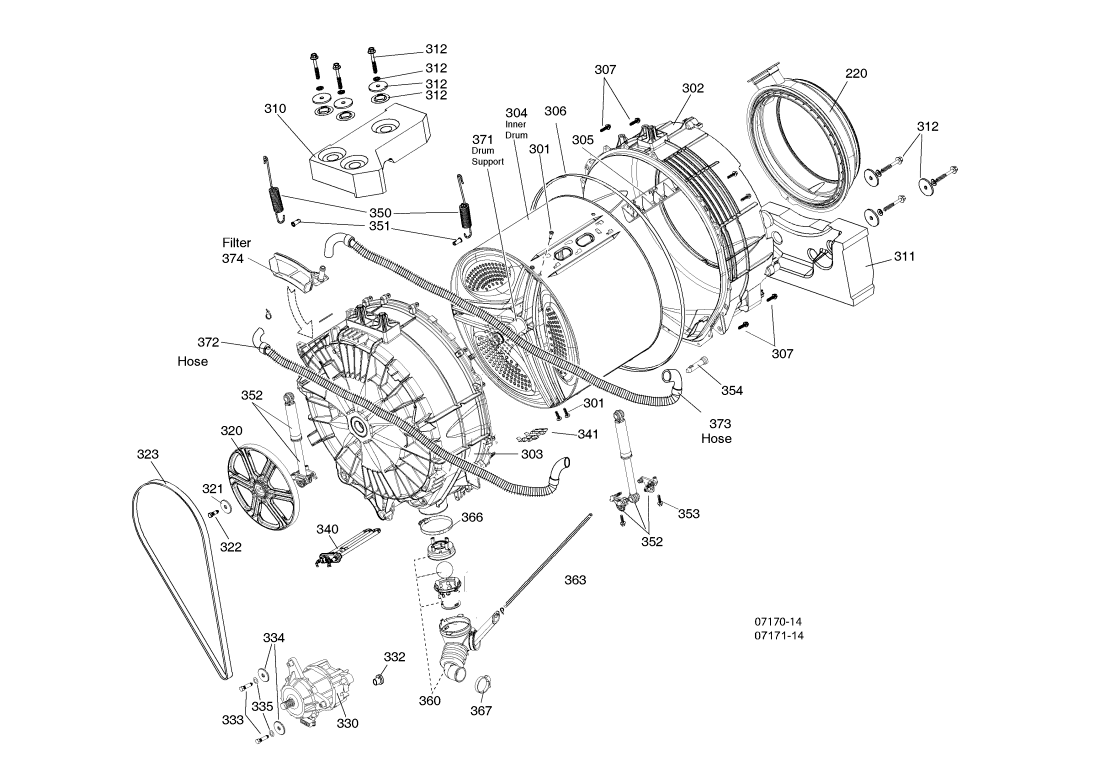
Some repairs require full part swaps. Here is what you need to know.
Motor Coupling (Top-Load)
• Part Cost: $15 to $25
• Time: 1 hour
• Tools: Screwdriver, socket set
• Tip: Lubricate new coupling lightly with appliance grease.
Drain Pump
• Part Cost: $70 to $120
• Time: 1 to 1.5 hours
• Test First: Bypass the pump with a test cord to confirm failure.
Door Lock Assembly (Front-Load)
• Part Cost: $40 to $60
• Time: 45 minutes
• Alignment: Ensure striker hits center of lock.
Heating Element
Needed for F07/F08 codes or cold washes.
Steps.
- Access from rear or bottom.
- Disconnect power and water lines.
- Remove old element and seal.
- Install new with rubber gasket.
- Refill and test for leaks.
Safety: Never operate without water in the tub. Element can burn out.
When to Repair vs. Replace
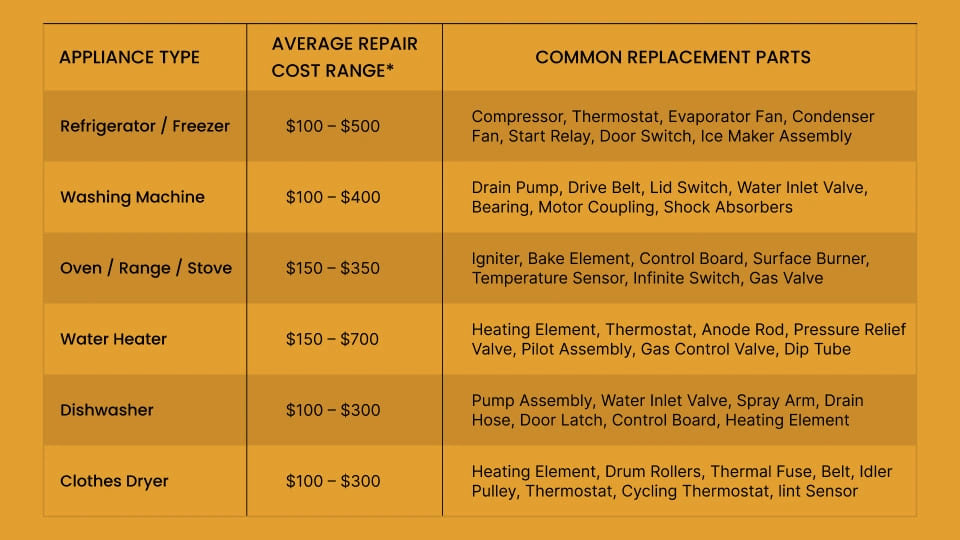
Most Hotpoint washers are worth repairing if they are less than 10 to 12 years old, have no tub rust or cracks, and repair cost is under 50% of a new unit.
Typical repair costs.
• Lid switch: $120 to $180 (parts plus labor)
• Drain pump: $180 to $250
• Motor coupling: $150 to $200
• Control board: $250 to $350
New washer cost: $500 to $900
Bottom Line: Repair wins in most cases.
Frequently Asked Questions About Hotpoint Washing Machine Repair
How do I reset my Hotpoint washing machine?
Unplug the machine from the power outlet for 1 minute. Plug it back in and try running a cycle. This resets the control board and may clear temporary error codes.
What does F05 mean on my Hotpoint washer?
F05 indicates a drain pump blockage or pump failure. Start by cleaning the drain filter at the bottom front of the machine. If the code persists, the drain pump likely needs replacement.
Can I repair my Hotpoint washer myself?
Yes, many common issues like drain filter cleaning, lid switch replacement, and motor coupling swap are DIY-friendly. Complex repairs involving control boards or motors may require professional service.
How much does Hotpoint washing machine repair cost?
Costs vary by issue. Lid switch repairs run $120 to $180. Drain pump replacements cost $180 to $250. Control board issues can reach $250 to $350 including parts and labor.
Why is my Hotpoint washer vibrating excessively?
Excessive vibration usually means the machine is unlevel or the load is unbalanced. Check that all four feet are stable. Redistribute clothes evenly in the drum.
Is it worth repairing a 10-year-old Hotpoint washer?
Yes, in most cases. Hotpoint washers are built on the GE platform with readily available parts. If the tub is intact and repair costs are under half the price of a new unit, repair is the smarter choice.
Key Takeaways for Hotpoint Washing Machine Repair
Hotpoint washing machines are built for serviceability. With shared GE platform parts, clear error codes, and straightforward designs, most failures are diagnosable and fixable. Whether you DIY the filter clean or call a pro for a control board swap, knowing the root cause saves time and money.
Start with error code interpretation. F05 is the most common and usually resolves with drain filter cleaning. For no-spin issues, check drainage first, then test the lid switch or motor coupling depending on your model type. Front-load owners should pay special attention to door gasket maintenance to prevent leaks.
Keep this guide handy. Next time your washer stalls or flashes F05, you will know exactly what to do.



