You press the power button on your GE washing machine, but nothing happens. No lights, no beep, no display. The machine is completely dead. If you are dealing with a GE washing machine no power no lights issue, you are not alone. This is one of the most common appliance failures reported across thousands of households every year. The good news is that most causes are diagnosable and fixable without replacing the entire unit.
The root cause is often the electronic control board, which fails in about two-thirds of all cases. However, other factors like power supply problems, faulty wiring, or tripped breakers can mimic the same symptoms. Jumping straight to part replacement without proper testing can waste both time and money. In this guide, you will learn how to systematically rule out simple fixes, test critical components with a multimeter, and identify whether your control board is failed or just needs programming.
Verify Power Source First
:strip_icc()/measuring-voltage-outlet-77726753-ac9266c6cc0c4b56bf0b663bedd85883.jpg)
Before opening the washer, confirm that power is actually reaching it. A surprising number of dead washers are simply disconnected from live power.
Test the Wall Outlet
Plug a lamp, phone charger, or hair dryer into the outlet to see if it works. If nothing powers on, the issue lies in your home electrical system.
For more accurate results, use a multimeter. Set it to AC Volts at the 120V range. Insert the probes into the outlet slots. A reading of 120 to 122 VAC means the outlet is functional. No voltage indicates a problem with your homes electrical supply.
Check Breakers and Fuses
Locate your electrical panel and look for a tripped breaker labeled laundry or washer. Flip it fully off, then back on. If your home uses fuses, inspect the washer circuit fuse for damage or discoloration.
Also check for GFCI outlets in the laundry room or nearby bathrooms. These have a test and reset button and can cut power completely if tripped. Press Reset firmly to restore power.
Avoid Power Strips and Extensions
Never plug a washing machine into a surge protector or extension cord. These cannot handle the appliances startup load and often fail silently. Always plug directly into a wall outlet.
Inspect the Power Cord
Even with a live outlet, a damaged power cord can prevent electricity from reaching the machine.
Look for Physical Damage
Unplug the washer and examine the cord from plug to entry point. Signs of trouble include fraying or cuts, melting or scorch marks, and bent or loose prongs. If any damage is visible, replace the cord immediately.
Test for Continuity
Use a multimeter to verify internal wire integrity. Unplug the washer and access the power cord connection at the control board. Remove the rear or side panel to reach the wiring harness. Disconnect the harness from the board. Set the multimeter to Continuity Mode. Test each wire by probing one end at the plug prong and the other at the harness terminal. The Hot wire, Neutral wire, and Ground wire must all beep or show low resistance. If any wire fails continuity, replace the power cord.
Check for Polarity Reversal
Reversed hot and neutral wiring can destroy control boards. To detect this, plug in the washer and use a non-contact voltage tester on the neutral wire. If it beeps, polarity is reversed. A licensed electrician must correct the outlet wiring before installing any new parts.
Perform a Hard Reset
Sometimes a temporary glitch locks up the control system. A hard reset clears the memory and may restore function.
How to Reset Your GE Washer
Unplug the washer from the wall. Wait 10 to 15 minutes. The minimum wait time is 2 minutes. Plug it back in. Try turning it on. This simple step resolves many no power issues caused by electrical surges or software hiccups.
Disable Control Lock
Check if Control Lock or Child Lock is activated. This disables all buttons and mimics a power failure. To disable it, press and hold the Control Lock button for 3 to 5 seconds. Listen for a beep or look for a lock icon to disappear.
Check for Stuck Buttons
Press every button on the control panel firmly. A stuck key can prevent the system from booting. If one feels jammed, gently pry it up with a flathead screwdriver.
Diagnose the Main Control Board
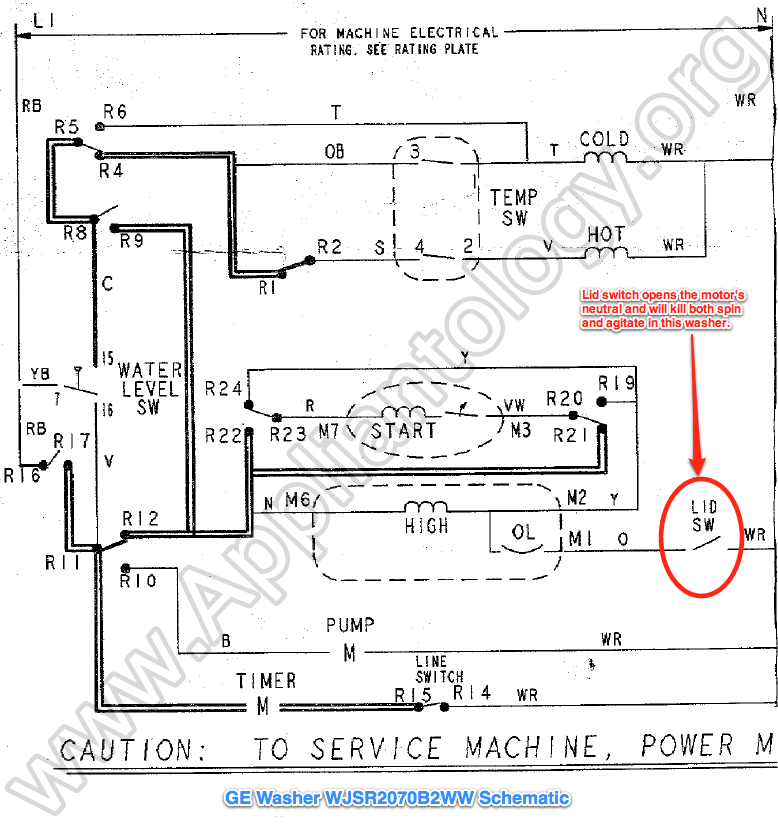
If power reaches the outlet and cord but the washer remains dead, the main control board is likely at fault. This component is responsible for 66 percent of no power cases.
Access the Control Board
Front load models require removing 3 screws from the back of the top panel. Slide the panel backward and lift it off. The control board is located behind the console.
Top load models require a quarter-inch nut driver to remove access panel screws. Lift and fold the console forward. The board is mounted inside the cabinet.
Always unplug the washer and wait 1 minute for capacitors to discharge before accessing internal components.
Look for Heartbeat LEDs
Many GE control boards have small diagnostic LEDs. One is located near the Wi-Fi module and one in the center of the board. Both should flash steadily when power is applied. No flashing indicates either no voltage is reaching the board or the board is dead.
Test Input Voltage at J101
Plug in the washer. Set multimeter to AC Volts. Probe the White wire and Black wire at connector J101. The expected reading is 120 VAC.
If 120V is present and LEDs are flashing, the board is likely good. If 120V is present but no LEDs appear, the control board has failed. No voltage means the problem is upstream at the cord, outlet, or wiring.
Test the User Interface
In some GE front loaders, especially models with Vent Fresh or UltraFresh systems, the interface assembly can fail independently.
Symptoms of Interface Failure
Display is dark while the drum light stays on. The display flashes briefly then goes black. There is no response to button presses.
Check DC Voltage Supply
Unplug the washer. Remove the detergent dispenser and 5 screws holding the front panel. Pivot the panel forward to access wiring. Set multimeter to DC Volts. Probe Pin 5 and Pin 4 on the interface connector. The expected reading is 13.8 VDC.
Test the harness coming from the main board at J615. Probe Pin 8 and Pin 4. If 13.8V is at J615 but 0V at the interface, the wiring harness is damaged. If 0V at J615, the main control board is not supplying power. If 13.8V reaches the interface but no display appears, the interface assembly is dead.
Examine Door and Lid Switches
A failed safety interlock can prevent the washer from powering up.
Front Load Door Lock
Ensure the door closes fully and latches with a distinct click. Debris like detergent residue or fabric fibers can block engagement.
Test for Continuity
Disconnect power. Access the door switch behind the front panel. Set multimeter to Continuity Mode. Press the switch plunger manually. Listen for a beep. No continuity when pressed means replace the switch.
Bypassing this switch is unsafe and not recommended. Modern GE models will throw errors if the lock is not detected.
Top Load Lid Switch
Located under the lid or inside the cabinet, open the lid and press the switch. Test for continuity. Replace if faulty.
Replace the Power Cord
If testing confirms a broken cord, replacement is straightforward.
Tools Needed
Quarter-inch nut driver, small flathead screwdriver, and multimeter for final testing.
Step-by-Step
Unplug the washer. Disconnect the harness from the control board. Remove the ground wire screw. Release the cord clamp by pushing it forward and lifting. Pull the old cord out. Insert the new cord, align the block, and pull back to lock. Reattach ground wire and reconnect the harness. Reinstall access panel. Test with multimeter before restoring power.
Replace the Main Control Board
If voltage reaches the board but it shows no signs of life, replacement is necessary.
Tools Needed
Phillips and flathead screwdrivers, camera to photograph wiring, and multimeter.
Removal Steps
Unplug the washer. Remove top panel using 3 rear screws. Take out detergent tray and control knob. Unscrew front panel and gently pull forward. Take photos of all wire connections. Release clips and remove screws securing the board. Carefully disconnect all harnesses.
Installation Tips
Install the new board and reconnect all wires exactly as pictured. Reassemble the front and top panels. Plug in the washer.
Program the Personality Code
New boards are generic and require programming. Power on the washer. Enter Service Mode. Use the dial to select your exact model number. Input the Personality Code from the technical sheet or part packaging.
Failure to program causes soap dispenser overfilling, bleach and softener not dispensing, display shutting off during selection, and error codes like 91, 38, or 26.
Replace the Interface Assembly
For front load models with a dead display but working drum light, the interface assembly may need replacement.
Software First
Unplug washer for 1 minute. Open detergent tray. Connect SUM installer to the RJ45 port under the rubber cover. Plug in washer. Wait for lights. Orange means On. Green flashing means Installing. Both solid means Complete. This takes about 10 minutes. If green flashes continuously, unplug and retry.
Physical Replacement
Remove Ethernet clip and screws for Start/Stop, dial, and options. Use a dental pick to release plastic tabs. Remove four gray corner locks. Swap the old interface with the new. Reinstall all screws and hand-tighten only to avoid stripping.
Reconnect RJ45 Correctly
The Ethernet connector must be installed upside down compared to standard orientation. Misalignment prevents communication between components.
Fix Special Cases

Drum Light On, Display Dead
This means partial power is getting through to the drum light circuit but the control board is not distributing low-voltage DC to the interface. Replace the main control board and verify heartbeat LEDs activate.
Post-Replacement Error Codes
If the washer displays Error 91, 38, or 26 after a board swap, or dispensers act erratically, the Personality Code is missing or incorrect. Enter diagnostic mode and reprogram the correct personality code for your model.
Prevent Future Failures
Use HE Detergent Only
Non-HE detergent creates excess suds and residue that clog sensors and drains, leading to error codes and shutdowns. Always use HE detergent in HE models.
Clean the Door Latch Weekly
Wipe the door seal and latch area to remove soap scum and fibers. This ensures proper locking and prevents false safety lockouts.
Check Water Inlet Screens
Every 3 to 6 months, shut off water valves. Disconnect hoses. Clean inlet screens of sediment. Reconnect and open valves fully. This ensures proper water flow detection.
Ensure Full Water Valve Opening
Some cycles require hot water even for cold washes. Partially closed valves can prevent the washer from starting.
Safety First: Know When to Call a Pro
Always unplug the washer before working on it. Wait at least one minute after unplugging to let capacitors discharge.
Call a qualified technician if you detect a burning smell or scorch marks, you are uncomfortable using a multimeter, the motor or internal wiring shows signs of damage, or you have replaced the board but the problem persists. DIY repairs on high-voltage appliances carry risks. When in doubt, get professional help.
Frequently Asked Questions About GE Washing Machine No Power
Why does my GE washer have no power but the outlet works?
The issue is likely inside the washer. After confirming the outlet has 120V, check the power cord for damage. If the cord is good, the main control board is the most probable cause. This component fails in approximately 66 percent of no power cases.
How do I reset a GE washing machine with no display?
Unplug the washer from the wall. Wait 10 to 15 minutes. Plug it back in and try turning it on. This hard reset clears temporary glitches in the control system. Also check that Control Lock is not enabled.
Can a tripped breaker cause a washer to have no power?
Yes. A tripped circuit breaker in your homes electrical panel will cut all power to the washer. Check the panel for a breaker labeled laundry or washer and flip it fully off then back on. Also check GFCI outlets in the laundry room.
What does it mean if the drum light works but the display is dead on my GE washer?
This indicates partial power is reaching the machine. The main control board is likely receiving line voltage but failing to distribute low-voltage power to the interface. Replace the main control board to resolve this.
Do I need to program a new control board on my GE washer?
Yes. New main control boards are generic and require programming with a Personality Code specific to your model. Without this programming, the soap dispenser may overfill and error codes may appear. Enter Service Mode and input the code from the technical sheet included with the part.
Key Takeaways for Fixing GE Washing Machine No Power Issues

A GE washing machine with no power and no lights is usually fixable. Start by verifying the outlet and power cord, then perform a hard reset. Test the main control board with a multimeter to confirm it is receiving 120V and check for heartbeat LEDs. If the board is dead, replace it and always program the Personality Code afterward. For front load models with a dead display but working drum light, test the interface assembly and its DC voltage supply. Use HE detergent only, clean the door latch weekly, and check water inlet screens every few months to prevent future failures. Safety is paramount, so unplug the washer before any internal work and wait one minute for capacitors to discharge.