
Is your Samsung washing machine leaving clothes with a musty smell or strange stains? You’re not alone. Over time, detergent residue, fabric softener buildup, and trapped moisture can turn your washer into a breeding ground for mold and mildew, especially in front-load models. The good news: cleaning your Samsung washing machine doesn’t require professional help. With the right steps, you can restore freshness, prevent errors like the 5C drain code, and extend your appliance’s life.
This guide covers everything from weekly wipe-downs to deep disassembly, tailored specifically for Samsung’s front-load and top-load models. You’ll learn how to run Self Clean and Pure Cycle correctly, clean hidden areas like the door gasket and pump filter, and tackle stubborn brown stains caused by greasy buildup.
Run Self Clean or Pure Cycle

Samsung’s built-in cleaning cycles are designed to flush out residue from hard-to-reach areas. These cycles use high water levels and extended agitation to remove grime that regular washes miss.
Activate Self Clean Correctly
Front-load models prompt you after 40 washes; top-load models after 20. When the Self Clean LED lights up, run the cycle as soon as possible. Delaying can lead to odor development and reduced efficiency.
To start:
1. Ensure the drum is completely empty.
2. Press the Self Clean button (or select Pure Cycle or Self Clean+ on the dial).
3. Press Start. Some models require holding the button for 3 seconds.
The cycle runs about 1 hour for top-load and 4 hours for front-load models. No additional cleaner is needed unless odors persist.
Handle Suds During Cleaning
If suds appear mid-cycle, it means detergent residue was left behind. Run a second Self Clean cycle immediately. To prevent this, avoid overusing detergent and leave the door open between washes.
For machines without Self Clean, use a commercial washing machine cleaner on a Hot Wash or Normal cycle. Always check your user manual for compatible alternatives.
Clean Detergent Drawer Monthly
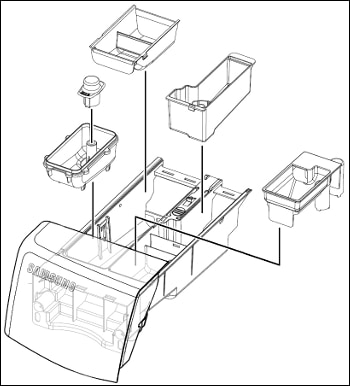
Detergent and fabric softener buildup clog dispensers, reduce cleaning power, and cause musty smells. A monthly deep clean keeps performance high.
Remove and Wash Drawer Components
- Pull the drawer out until it stops.
- On front-load models, press the release lever inside the drawer and pull it free.
- On top-load models, lift the drawer upward after pulling it out.
- Remove internal trays and rinse under warm water.
- Use a soft brush to scrub away sticky residue.
For Auto Dispenser models (e.g., WF50A8800AV), pull out the drawer using the inner release, remove compartment lids using the rear pull tabs, and flush compartments with lukewarm water to dissolve buildup.
Wipe Drawer Recess
After removing the drawer, use a damp microfiber cloth or non-metallic brush to clean the cavity inside the machine. This area collects sludge and is often overlooked.
Critical step: Dry the recess completely before reinserting the drawer. Moisture here causes mold and drainage issues.
Wipe Door Gasket Weekly
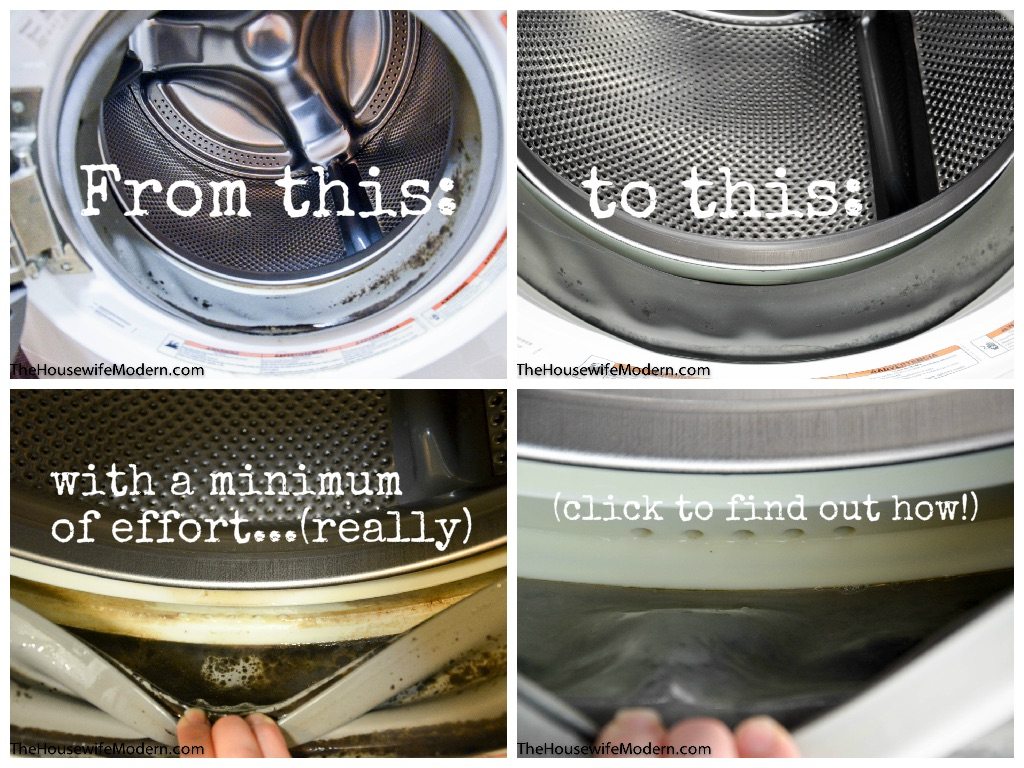
The rubber seal on front-load washers traps water, lint, and soap, making it the number one source of bad odors.
Remove Mold from Gasket Folds
- Open the door and gently pull back the rubber folds.
- Wipe all crevices with a soft cloth dampened with warm, soapy water.
- For visible mold, use a mix of half water, half bleach on a cloth. Never pour bleach directly.
- Dry thoroughly with a clean towel.
Pro tip: After every wash, leave the door slightly ajar to allow airflow. This simple habit prevents 90% of gasket-related mold.
Drain and Clean Pump Filter
A clogged pump filter causes poor drainage and triggers the 5C error code. Clean it every month or every 40 washes.
Prepare Before Opening Filter
- Unplug the washer. Safety first.
- Wait at least 1 hour after a hot cycle to let water cool.
- Place towels and a shallow pan under the filter panel.
Remove and Flush Filter
- Locate the access panel at the bottom front.
- Open it by pressing the center or using a coin if needed.
- Unscrew the emergency drain cap counterclockwise.
- Let water drain slowly into the pan. Recap, empty, and repeat if necessary.
- Twist the main filter counterclockwise to remove. Some models require pushing in first.
Rinse the filter under running water. Use a toothbrush to remove hair and gunk.
Check Drain Pump Impeller
Shine a light into the filter housing. Look for the impeller (small fan). Spin it gently with your finger. If it’s stuck or blocked, clear debris with tweezers or a brush.
Reinstall by inserting the filter and twisting clockwise until vertical. Do not overtighten, then secure the panel and plug in the machine.
Eliminate Odors with Bleach Cycle
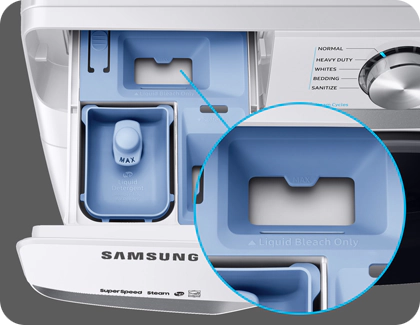
When regular cleaning fails, use bleach to kill mold and sanitize the drum.
Use Bleach Safely
- Run a Spin-only cycle to drain leftover water.
- Pour liquid chlorine bleach into the detergent dispenser up to the max line.
- Never pour bleach directly into the drum. It can damage rubber and metal parts.
- Select Self Clean, Pure Cycle, or Sanitize and start immediately.
Cycle duration is 1 to 4 hours depending on model.
Rinse After Bleach
After the cycle ends, wipe the drum with paper towels to remove residue. Run a Rinse+Spin cycle to flush out bleach. Repeat rinse if a strong smell remains. Leave the door and drawer open to dry.
Clean Exterior Surfaces Weekly
Smudges, spills, and water spots dull your washer’s finish. Weekly cleaning prevents permanent blemishes.
Use Safe Cleaning Tools
- Dampen a microfiber cloth with mild dish soap or ceramic cooktop cleaner (e.g., Cerama Bryte).
- Wipe the door, control panel, and sides in circular motions.
- Rinse with a clean damp cloth.
- Dry completely with a soft towel.
Avoid abrasive pads, ammonia-based cleaners, or vinegar on the control panel. These can damage the display and coating.
Deep Clean Top-Load Washer Annually
Brown stains on clothes? The likely culprit is fabric softener buildup in the agitator and tub base. If monthly cleaning doesn’t help, disassemble your top-load model every 6 to 12 months.
Gather Required Tools
You will need the following items:
• Phillips and flathead screwdrivers
• 10-mm socket with ratchet
• 36-mm wrench (may need modification)
• Soft brush and damp cloth
Disassemble Tub Safely
- Unplug the machine.
- Remove the control panel by unscrewing three Phillips screws (two corners, one center), lifting the panel up, and disconnecting the ground wire.
- Detach the tub frame by removing four screws and releasing six plastic clips with gentle pressure.
- Remove the agitator by prying off the center cap with a flathead screwdriver and using a 10-mm socket on the agitator nut.
- Critical: This nut is right-hand threaded. Turn clockwise to loosen.
- Remove the tub nut using a 36-mm wrench. This also loosens clockwise, opposite of standard threading.
Lift out the inner tub.
Scrub Hidden Buildup
Inspect the base for gray or brown sediment. Use a flathead screwdriver and soft brush to clean holes, ribs, and crevices. Even small deposits can stain clothes.
Wipe all surfaces with a damp cloth and mild detergent.
Reassemble in Order
- Reinstall tub and secure with the 36-mm nut.
- Replace agitator and tighten nut. Remember: clockwise to loosen, so counterclockwise to tighten.
- Snap tub frame back into place.
- Reconnect ground wire.
- Replace control panel and screws.
Run a hot wash cycle with vinegar or cleaner to flush debris. Check for leaks and noise.
Follow Maintenance Schedule
Sticking to a routine prevents most issues before they start.
Monthly Tasks
Perform these tasks each month:
• Run Self Clean or Pure Cycle
• Clean detergent drawer and recess
• Inspect and wipe door gasket
• Check for error codes or slow drainage
Every 6 Weeks
Clean the drain filter to prevent 5C errors.
Every 6 to 12 Months
Perform deep tub cleaning (top-load) and inspect hoses and connections.
Prevent Common Problems
Avoid these mistakes to keep your Samsung washer running smoothly.
Avoid Detergent Overuse
Excess suds do not clean better. They leave residue and feed mold. Use high-efficiency (HE) detergent and follow label dosing.
Wash in Warm Water Occasionally
If you only use cold cycles, grime builds faster. Run a warm or hot wash once a month to dissolve oils and softener.
Leave It Open After Use
Always leave the door and detergent drawer open after washing. Trapped moisture causes 99% of odor issues.
Frequently Asked Questions About Cleaning Samsung Washing Machine
How often should I run the Self Clean cycle on my Samsung washing machine?
Run the Self Clean cycle monthly, or when the LED reminder activates after 20 washes for top-load models and 40 washes for front-load models. Even if you wash less frequently, running it once per month maintains optimal cleanliness.
Why does my Samsung washer smell musty even after cleaning?
Musty odors usually stem from leaving the door closed between loads, using too much detergent, or gasket buildup. Leave the door ajar after every wash, use HE detergent sparingly, and wipe the door gasket weekly with warm, soapy water.
What does the 5C error code mean on my Samsung washing machine?
The 5C error code indicates poor drainage. This typically means the pump filter is clogged, the drain hose is kinked, or the spigot is blocked. Clean the pump filter and check the drain hose connections to resolve this issue.
Can I use vinegar to clean my Samsung washing machine?
While vinegar is a popular natural cleaner, avoid using it on the control panel as it can damage the display. You can add vinegar to the drum during a hot wash cycle for odor removal, but for deep cleaning, the Self Clean cycle with bleach is more effective for killing mold and bacteria.
How do I clean the detergent drawer on a Samsung front-load washer?
Pull the drawer out until it stops, press the release lever inside, and pull it free. Remove all internal dispensers, rinse under warm water, and scrub with a soft brush. Clean the drawer recess with a damp cloth, then dry completely before reinserting.
Why do brown stains appear on clothes after washing?
Brown stains are typically caused by fabric softener buildup becoming greasy and sedimentary. This is common in top-load washers. Perform a deep clean by disassembling the tub and agitator, or run multiple bleach cycles to dissolve the buildup.
Key Takeaways for Maintaining Your Samsung Washing Machine
Cleaning your Samsung washing machine is not just about eliminating smells. It directly impacts performance, prevents costly repairs, and extends your appliance’s lifespan. The most critical habits are leaving the door open after each use, running Self Clean monthly, and wiping the door gasket weekly. For front-load owners, the pump filter requires attention every 6 weeks to prevent drainage issues and 5C errors. Top-load users should consider annual disassembly if fabric softener stains persist. By following this maintenance schedule, your Samsung washer will deliver fresh, truly clean laundry for years to come.



