
Is your Insignia washing machine not starting, leaking, or displaying confusing error codes? You are not alone. Many owners encounter problems like E1, E2, and E4 error codes, drainage failures, or loud spinning noises, especially after years of heavy use. The good news? Most issues can be diagnosed and fixed at home with basic tools and a clear plan. This guide provides step-by-step repair instructions, error code decoding, and proven maintenance tips to get your washer running again without calling a technician for every small glitch.
From clogged inlet filters to failed motor couplings, we will show you exactly what to check, when to DIY, and when it is time to call a pro. Whether you are troubleshooting a no-spin issue or replacing a faulty door lock, this complete resource covers every critical system: water flow, drainage, control boards, belts, and more.
Decode Insignia Error Codes
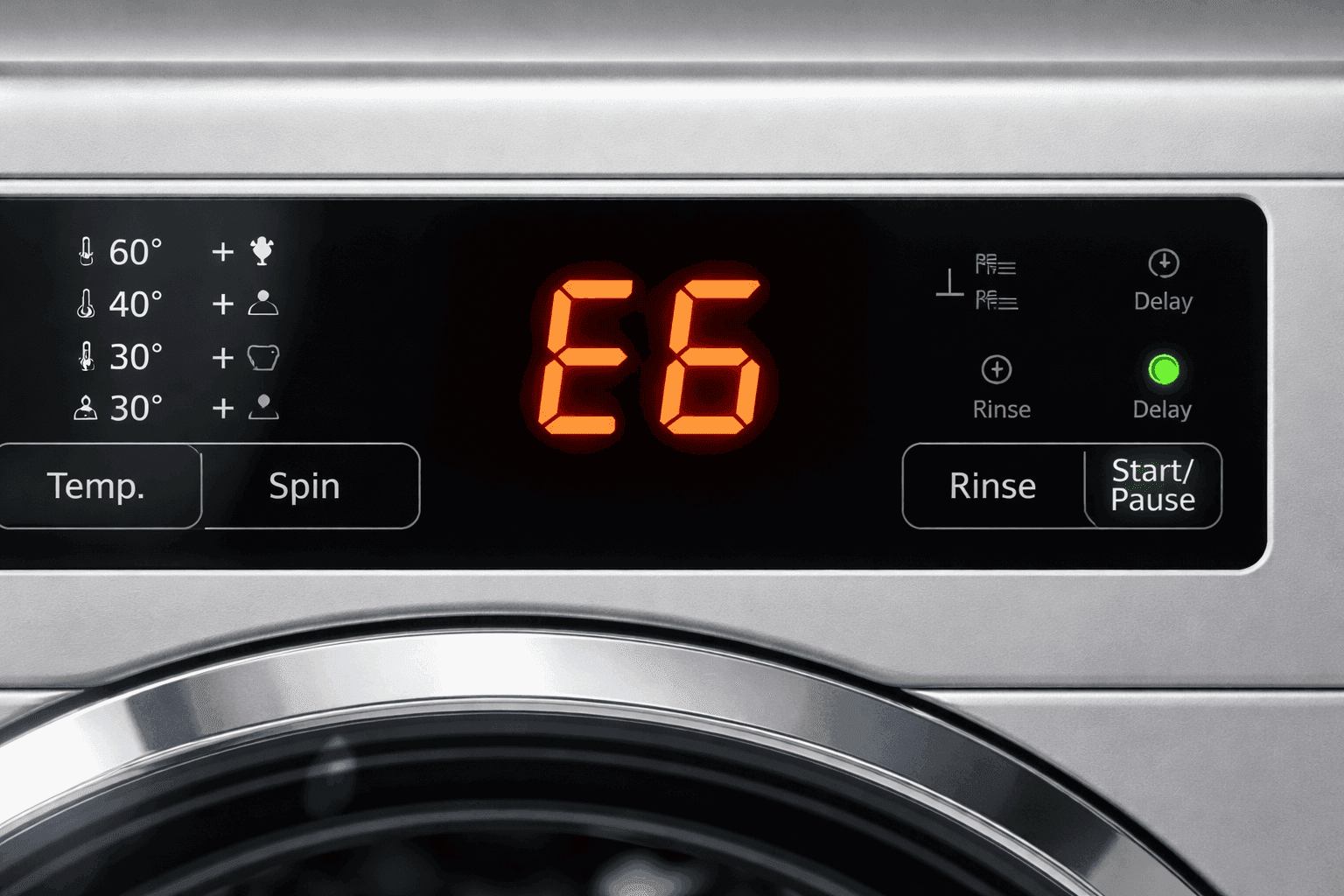
Insignia washers use specific error codes to pinpoint problems. Knowing what each one means saves time and prevents misdiagnosis.
| Code | Problem | Can You Fix It? |
|---|---|---|
| E1 | Water is not filling in 30 minutes | Yes. Check hoses, pressure, and filters |
| E2 | Drain cycle takes over 10 minutes | Yes. Clear blockages or adjust hose height |
| E3 | Lid is open during cycle | Yes. Close and relatch lid |
| E4 | Load imbalance detected | Possibly. Redistribute clothes or level machine |
| E5 | Impact switch pressed | Yes. Level washer and check clearance |
| F2/F5/F8 | Control board or sensor failure | No. Requires professional repair |
| FD/CL | Lid lock or child lock issue | CL: Yes / FD: No |
Pro Tip: If you see F2, F5, F8, FD, or C9, the problem is likely internal electronics. These require a technician, so do not waste time on DIY fixes.
Fix Power and Startup Failures

If your Insignia washer shows no lights or response, follow this checklist to restore power.
Washer Will Not Turn On
- Check the outlet. Plug in a lamp or phone charger. If nothing works, reset the circuit breaker.
- Verify lid or door closure. The safety switch blocks startup if the lid is not fully shut. Close firmly and listen for a click.
- Disable Child Lock (CL). Press and hold the Power button for 3 to 5 seconds to disable. If CL appears on the display, this is likely the cause.
- Cancel Delay Start. Some models will not start if delayed. Press Delay until it reads 0.
- Reset the control board. Unplug the washer for 2 minutes, then plug back in. This clears temporary glitches.
Warning: If power still fails after reset, inspect the main control board or door lock switch. Both need pro service.
Solve Water Fill Problems
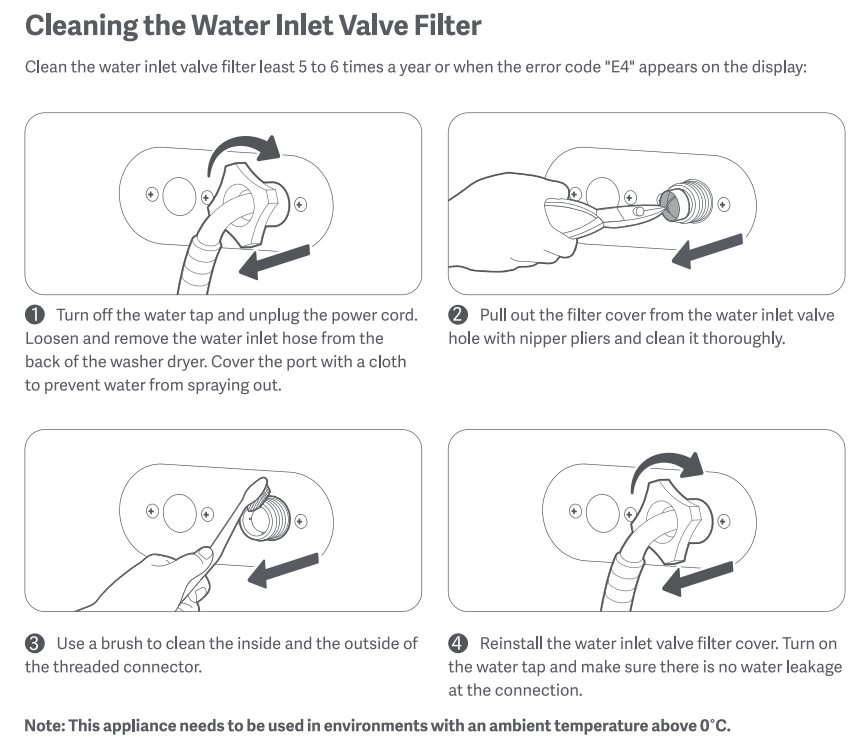
An E1 error means the tub is not filling within 30 minutes. Here is how to fix it.
Inspect Inlet Hoses
Ensure both hot and cold water valves are fully open. Look for kinks or crushing behind the machine. Confirm hoses are connected correctly: red to hot, blue to cold.
Clean Inlet Valve Filters
- Turn off water supply.
- Disconnect hoses from the back of the washer.
- Use pliers or a small brush to remove debris from the mesh filter screens inside the valve ports.
- Flush water through the open hose ends into a bucket to clear line sediment.
- Reconnect and test.
Prevention Tip: Clean filters every 3 to 6 months to avoid E1 errors and low pressure.
Test Water Pressure
Low household pressure prevents proper fill. Run a nearby faucet. If flow is weak, the issue is plumbing-related, not the washer.
Fix Drain and Spin Failures
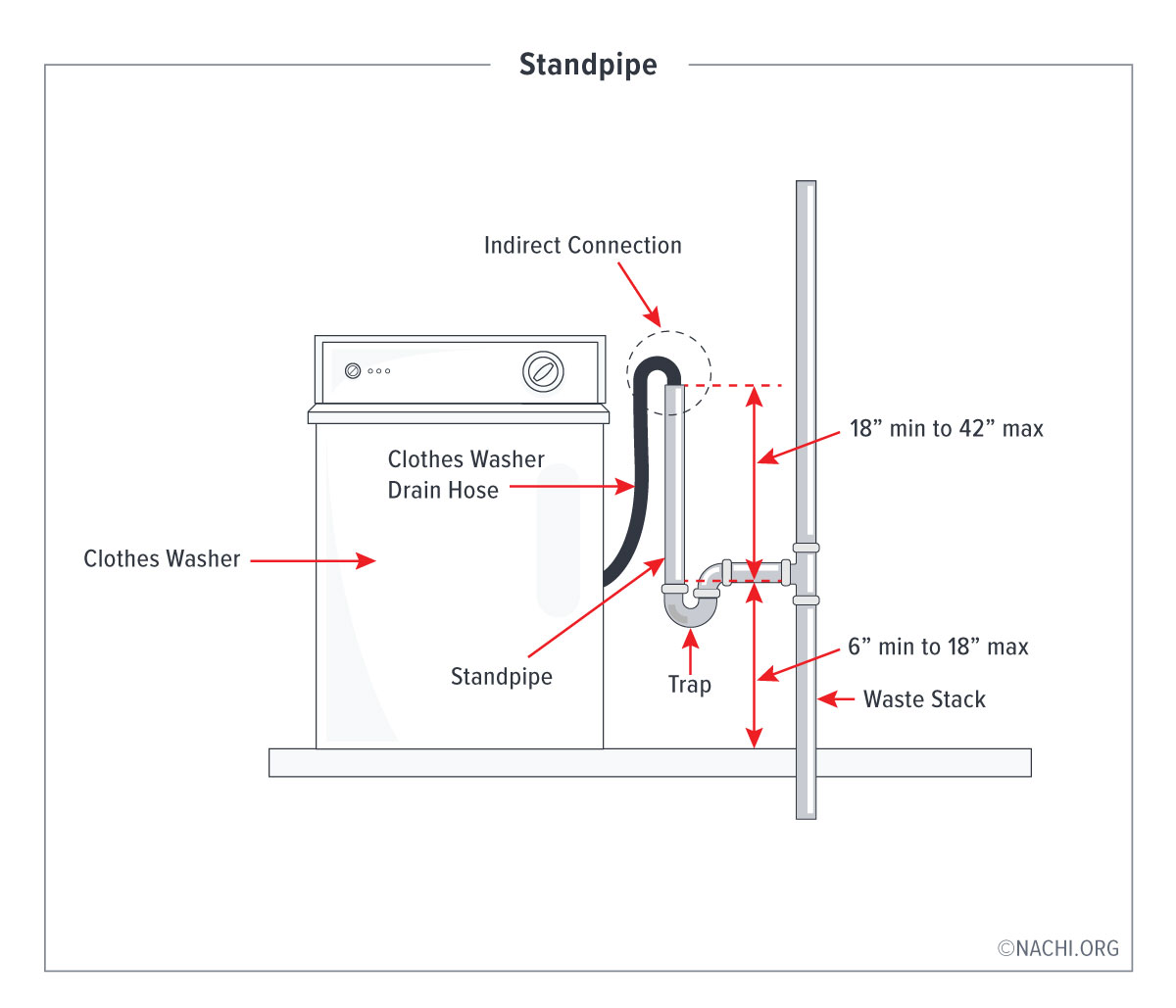
An E2 error means draining takes too long. Most fixes are simple.
Check Drain Hose Height
The hose must be between 30 inches and 96 inches from the floor. Too low causes siphoning. Too high causes pump overload. Never seal the hose into the standpipe. Leave an air gap.
Clear Standpipe Blockages
Remove the drain hose. Use a plumber’s snake or long wire to clear any clogs in the standpipe. Run water down the pipe to test flow.
Inspect Drain Pump Filter
Some Insignia models have an accessible pump filter.
- Place towels under the front.
- Open the filter access panel, usually bottom front.
- Slowly unscrew the cap. Water will drain out.
- Remove coins, hair, or debris from the impeller.
Note: If the pump hums but does not drain, the impeller may be broken. Replace the pump.
Diagnose No Spin or Agitation
If the washer fills and drains but will not spin or agitate, the issue is mechanical.
Top Load: Check Motor Coupling
Symptom: Motor hums, but tub does not move. Cause: Worn motor coupling, common in direct-drive models.
Replace in 5 Steps:
- Unplug the washer.
- Remove the cabinet or front panel.
- Disconnect the motor and locate the coupling between motor and transmission.
- Pry off broken plastic forks and rubber center.
- Press new coupling onto both shafts and reassemble.
Pro Tip: Always replace the full kit. Rubber spiders wear out fast if forks are cracked.
Front Load: Inspect Drive Belt
Symptom: Squealing noise or no spin. Cause: Cracked or loose serpentine belt.
To Replace:
- Disconnect power and remove front or rear panel.
- Release tension on idler pulley.
- Slide old belt off drum and motor pulley.
- Install new belt, ensuring ribs align.
- Re-tension and test.
Tip: Use only OEM-spec belts. Cheap replacements fail within months.
Stop Leaks and Water Pools
Water under the washer can come from several places. Check each potential source.
Inlet Hoses
Tighten connections at the back. Do not overtighten. Inspect for cracks or bulges. Replace if aged.
Drain Hose
Ensure it is not cracked and is properly seated in the standpipe. No sealant. Sealing causes vacuum lock and overflow.
Detergent Dispenser
Remove the tray and rinse under warm water. Buildup causes overflow during fill.
Door Seal (Front Load)
Wipe the rubber gasket weekly. Check for tears or trapped debris. Leave the door ajar after use to dry.
Internal Leak Clue: If no external source is found, suspect a failed tub seal, pump, or inlet valve. This requires cabinet removal.
Silence Noise and Vibration
Loud noises are not just annoying. They signal serious wear.
Level the Washer
- Use a bubble level on the top.
- Adjust front and rear feet until balanced.
- Tighten lock nuts to prevent shifting.
Test: Gently rock the machine. No movement means properly leveled.
Check Load Balance
Do not wash heavy items like rugs alone. Redistribute laundry if E4 error appears.
Diagnose Belt Noise
Squealing means worn or loose belt. Replace. Thumping means object in drum or slipping belt. Inspect both.
Agitator Cogs (Top Load)
Symptom: Grinding during agitation. Upper agitator spins freely. Fix: Replace directional cogs.
Steps:
- Remove fabric softener cap.
- Unscrew central bolt using socket wrench.
- Lift off upper agitator.
- Swap worn cogs and bearing.
- Reassemble and test.
Part Tip: Buy a full cog kit. It includes all dogs and support pieces.
Replace Key Components

Water Inlet Valve
If water drips into the tub when off, the inlet valve is stuck.
Replace It:
- Shut off water and unplug.
- Remove rear panel, typically 3 screws.
- Disconnect hot and cold hoses.
- Unplug electrical connector.
- Remove mounting bracket.
- Install new valve with clean filters.
- Reconnect and test for leaks.
Critical: Use a dual-solenoid OEM valve. Aftermarket parts often fail early.
Door Lock Assembly (Front Load)
If the cycle will not start or the door stays locked, follow these steps.
Steps:
- Unplug washer.
- Remove front panel or top door ring.
- Inspect strike plate on door for damage.
- Test lock switch with multimeter for continuity.
- Replace entire assembly if faulty.
Never force a locked door. Risk of damaging the latch or control board.
Maintain Your Washer Long-Term
Regular care extends your Insignia washer life beyond 5 to 7 years.
Monthly Cleaning
Run an empty hot cycle with 1 cup white vinegar or a washing machine cleaner. Removes soap scum, mold, and odors.
Gasket Care (Front Load)
Wipe dry after every use. Leave door open when idle.
Use HE Detergent Only
Regular detergent causes oversudsing. This leads to E4 errors and poor rinsing. HE suds less and rinses clean.
Load Smart
Do not exceed 80% capacity. Mix large and small items to balance load.
Belt and Hose Checks
Inspect belts every 6 months for cracks or glazing. Replace drain hose if brittle or split.
When to Repair vs. Replace
Use this rule to decide the smart choice.
| Factor | Repair If… | Replace If… |
|---|---|---|
| Cost | Less than 50% of new unit price | More than 50% of new unit price |
| Age | Under 10 years | Over 10 to 15 years |
| Issue | Single component like pump, belt | PCB, transmission, or repeated failures |
Common Repair Costs
- Motor coupling: $25 plus DIY labor
- Drive belt: $30 plus DIY labor
- Inlet valve: $40 plus DIY labor
- Control board: $120 to $180 plus pro labor
- Professional diagnosis: $89 to $100, often waived if repair is done
User Insight: Insignia washers last 5 to 7 years on average. After that, inlet valves, bearings, and belts fail more often.
Safety First: Repair Protocols
Always follow these rules to protect yourself and your washer.
- Unplug before any repair, even for hose checks.
- Shut off water before disconnecting lines.
- Use a multimeter safely. Only test on de-energized circuits.
- Wear gloves. Sharp metal edges are common inside cabinets.
- Lift with legs. Drums and motors are heavy.
Pro Advice: If you are unsure, stop. One wrong move can damage the control board or create a leak hazard.
Frequently Asked Questions About Insignia Washing Machine Repair
What does E1 mean on my Insignia washer?
E1 means the tub is not filling within 30 minutes. Check that water valves are open, inlet hoses are not kinked, and clean the inlet valve filters. This error is usually user-serviceable.
Why is my Insignia washer not draining?
The drain hose may be kinked or clogged. Ensure the hose height is between 30 and 96 inches from the floor. Check the standpipe for blockages and inspect the drain pump filter for debris.
Can I replace the motor coupling myself?
Yes. Unplug the washer, remove the cabinet, and locate the coupling between motor and transmission. Pry off broken plastic forks and press the new coupling onto both shafts. This is a common DIY repair taking about an hour.
How do I fix a leaking water inlet valve?
Shut off water supply and unplug the washer. Remove the rear panel, disconnect hoses, and replace the entire valve assembly. Use an OEM dual-solenoid valve for reliable performance.
When should I call a professional for my Insignia washer?
Call a pro if you see error codes F2, F5, F8, FD, or C9. These indicate control board, sensor, or lid lock failures that require professional diagnosis and replacement.
How long do Insignia washers typically last?
With proper maintenance, Insignia washers last 5 to 7 years. Regular cleaning, using HE detergent, and avoiding overloading can extend the lifespan beyond the average.
Key Takeaways for Insignia Washing Machine Repair
Most Insignia washing machine repair tasks are DIY-friendly, especially error codes, clogs, and worn belts. By cleaning filters, leveling the unit, and replacing common parts like motor couplings or inlet valves, you can save hundreds in service fees. Understanding error codes helps you distinguish between simple fixes and problems requiring professional attention. Codes like E1, E2, E3, and E4 are typically user-serviceable, while F2, F5, F8, and C9 require a technician.
Stick to regular maintenance. Use HE detergent, avoid overloading, and clean filters every 3 to 6 months. This keeps your washer running strong for years. When repair costs exceed half the price of a new unit or the machine is over 10 to 15 years old, consider replacement instead.



