
Is your Whirlpool Duet washing machine frozen, unresponsive, or flashing error codes? You’re not alone. Thousands of users face control lockups, stuck cycles, and door lock issues every year. The good news: in over 80% of cases, a simple reset can restore full function without calling a technician. Resetting your Whirlpool Duet works like rebooting a computer. It clears temporary software glitches, resets the control board, and reinitializes sensors. Whether you’re dealing with a locked door, a blank display, or persistent error codes, this guide delivers step-by-step solutions you can try right now.
Power Cycle the Washer

This is the most reliable way to reset any Whirlpool Duet model. A full power cycle cuts electricity to the control board, drains residual power from internal capacitors, and forces a clean system reboot.
Unplug and Wait 5 Minutes
Unplug the washer directly from the wall outlet. If it’s hardwired, turn off the circuit breaker. Wait at least 5 minutes. This ensures complete capacitor discharge. While some guides suggest 1 minute, Whirlpool’s technical specs confirm that 5 minutes clears deeper memory errors. For stubborn lockups, leave it unplugged for up to an hour.
Press Start to Discharge Residual Power
While the unit is unplugged, press and hold the Start/Pause button for 10 seconds. This manual press helps drain any leftover current in the control panel, improving reset success. Skip this step if the button is unresponsive.
Restore Power and Test
Plug the washer back in or flip the breaker. You may hear a beep or see lights flash. This means the system is resetting. Press Power, select Rinse and Spin, and start the cycle. Check that the door locks, water drains, and the display responds.
Use Control Panel Reset Sequences
When unplugging isn’t convenient, these soft reset sequences can clear errors and restart the system using only the control panel.
Hold Start/Pause for 3 Seconds
Press and hold the Start/Pause button for 3 seconds. This often clears minor glitches like frozen displays or interrupted cycles. This method works on most Duet models made after 2010.
Press Cancel 5 Times
Press the Cancel button five times in quick succession. Some users report success with a 5-second hold instead. This resets the current cycle state and may unlock the door.
Try Power Plus Start Combination
Press and hold Power and Start simultaneously for 5 seconds. This combination forces a soft reboot and is effective for control lock issues.
Clear Error Codes Instantly
For recurring errors like F5E2 or INT, try this sequence.
• Press Pause/Cancel twice
• Press Power once
This clears the code from the display. Important: This doesn’t fix mechanical issues. It only resets the alert.
Perform a Master Reset (Door Cycle)
This advanced reset, known as the door cycle, forces the control board to reinitialize. It’s highly effective for drain errors, spin failures, and unresponsive controls.
Open and Close Door 6 Times Fast
After plugging the washer back in, open and close the door six times within 12 seconds. Count aloud to keep pace. Each motion must be full. Don’t just nudge the door.
Repeat if No Response
If nothing happens, unplug again, wait 2 minutes, and repeat the sequence. Some models require up to 12 repetitions or two full attempts before the reset activates.
Run Calibration After Reset
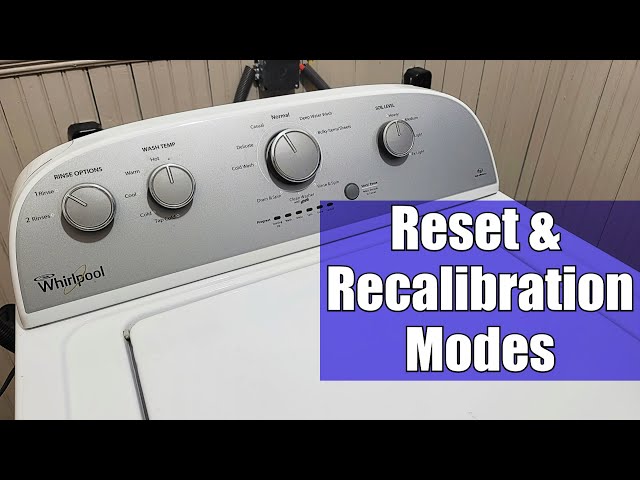
After moving the washer, replacing parts, or performing a deep reset, calibration ensures sensors read load, water, and balance correctly.
Set Dial to Normal Mode
Turn the cycle selector to Normal. This is required to enter calibration mode on compatible models with LED indicators below the dial.
Rotate Dial in LRRR-LR Sequence
Follow this exact pattern.
• Turn Left (1 click)
• Turn Right (3 clicks)
• Turn Left (1 click)
• Turn Right (1 click)
Use the mnemonic LRRR-LR to remember. This sequence signals the board to enter setup mode.
Start and Let Run 10 Minutes
Press Start. The washer will run internal diagnostics. Do not open the door or stop it. The cycle lasts about 10 minutes and recalibrates water pressure, load balance, and drum sensors.
Fix a Locked Door After Reset

A door that won’t unlock is often due to power glitches or error codes. Not mechanical failure. Don’t force it open.
Power Cycle to Release Lock
Unplug the washer for 5 minutes. The door lock solenoid resets when power drops. After restoring power, press Pause/Cancel. The door should unlock.
Run Drain and Spin Cycle
If water remains in the drum, the safety lock stays engaged. Plug in the washer and run Drain and Spin. Once water is gone, the door should release.
Check for Control Lock Activation
If the control panel is dead but the door is locked, the Control Lock feature may be on. Look for a padlock icon. Press and hold the Control Lock button for 3 to 5 seconds to disable.
Inspect Door Seal and Latch
Clean the rubber door seal and check for clothing, lint, or debris blocking the latch. A clogged seal can prevent proper closure and trigger lock errors.
Replace Door Lock if Needed
If the door still won’t unlock and no water is present, the door lock assembly (Part # W10169370) is likely faulty. This part commonly fails after 5 or more years due to heat stress or electrical wear.
Clear Common Error Codes
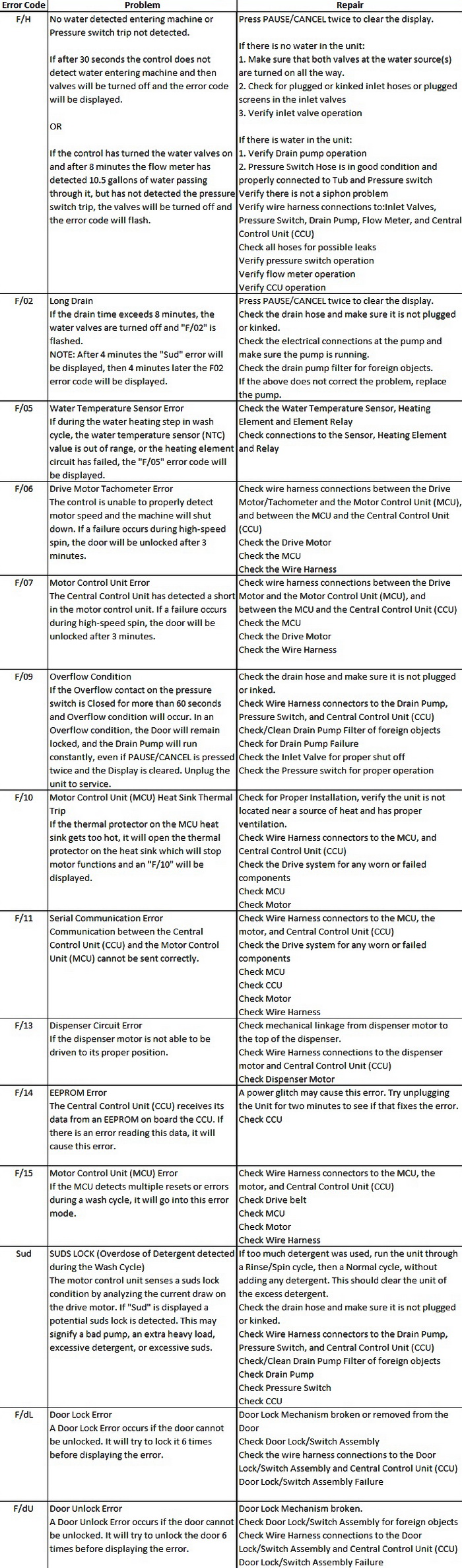
Resetting removes error codes. But recurring codes mean a physical issue exists. Diagnose before resetting again.
F5E2 or F5E3: Door Lock Error
Cause: Failed door lock, wiring issue, or control board glitch.
Fix: Replace lock assembly if reset fails. Check wiring harness for damage.
F8E1: Low Water Flow
Cause: Clogged water inlet filters or low home water pressure.
Fix: Remove hoses and clean mesh filters. Ensure water valves are fully open.
F20 or F21: Drain Error
Cause: Blocked drain pump filter or kinked hose.
Fix: Clean the pump filter (located behind front kick panel). Check for coins, socks, or debris.
UE or OE: Unbalanced Load
Cause: Uneven laundry distribution or overloading.
Fix: Redistribute clothes. Never exceed the drum’s three-quarter full line.
F1 or F2: Control Board Fault
Cause: Sensor communication failure or board damage.
Fix: Reset first. If code returns, the main control board may need replacement.
Prevent Future Reset Needs
Regular maintenance reduces the need for resets and extends your washer’s life beyond 8 years.
Clean Door Seal Weekly
Wipe the rubber gasket with a vinegar-soaked cloth. Mold and debris trap moisture and interfere with the door lock.
Leave Door Open After Use
This prevents mildew and allows the seal to dry. It also reduces internal humidity that can confuse sensors.
Clean Drain Pump Monthly
Remove the front access panel and clean the pump filter. This prevents F20/F21 errors and drain failures.
Use High-Efficiency Detergent Only
Regular detergent creates excess suds that trigger overflow sensors and error codes. HE detergent is required for Duet models.
Level the Washer Properly
Use a bubble level. Uneven positioning causes vibration, misalignment, and false unbalance (UE) errors.
Run Cleaning Cycle Monthly
Use a washer cleaner or 2 cups of white vinegar on the hottest cycle. Keeps sensors accurate and drum odor-free.
When to Call a Technician

A reset won’t fix hardware damage. Call a pro if you notice these warning signs.
• Burning smell or smoke comes from the unit
• Water pools under the washer (indicates hose or drum leak)
• Grinding or loud banging during spin cycle
• Same error returns after 3 resets
• Control board has burn marks or loose wires
Never force a locked door. You risk breaking the latch, seal, or safety interlock. Repairs can cost $200 or more.
Frequently Asked Questions About Resetting a Whirlpool Duet
How do I reset my Whirlpool Duet washing machine?
The most effective method is to unplug the washer from the wall outlet, wait 5 minutes, then plug it back in. This power cycle clears 80% of common electronic issues. You can also try holding Start/Pause for 3 seconds or pressing Cancel 5 times for a soft reset.
Why is my Whirlpool Duet door locked and won’t open?
This is usually caused by a power glitch or error code. Unplug the washer for 5 minutes to reset the door lock solenoid. If water remains in the drum, run a Drain and Spin cycle. If the problem persists, the door lock assembly (Part # W10169370) likely needs replacement.
What does the door cycle reset do on a Whirlpool Duet?
The door cycle reset forces the control board to reinitialize. Open and close the door 6 times within 12 seconds after plugging the washer back in. This method works for stuck cycles, drain errors, and unresponsive controls.
How do I clear error codes like F5E2 or F8E1?
Press Pause/Cancel twice, then press Power once. This clears the displayed error code. However, if the code returns, there is a physical issue that requires inspection. F5E2 indicates a door lock problem. F8E1 means low water flow.
Does resetting my washer delete my settings?
A basic power cycle or soft reset does not delete your settings. However, the Demo/Factory reset (unplug for 5 minutes while holding Start/Pause) returns all settings to original factory defaults and will erase any saved preferences.
Key Takeaways for Resetting Your Whirlpool Duet
Resetting your Whirlpool Duet washing machine is the fastest, most effective first step for most electronic issues. The 5-minute power cycle resolves 80% of problems. Combine it with door cycle resets and error-specific sequences for near-total coverage. Always prioritize safety: unplug before inspection, never force parts, and respect the machine’s built-in diagnostics.
After any reset, run a test cycle with an empty drum to verify the door locks, water fills, and display responds normally. If error codes return after resetting, inspect the physical components. Clean the drain pump filter, check water inlet hoses, and verify the door seal is clear of debris.
With proper care and timely resets, your Duet can run smoothly for years. For persistent issues, consult your model’s manual or contact Whirlpool support with your serial number ready.



