
If you’ve just brought home a new Samsung washing machine, you might be staring at its sleek interface, unsure where to start. With advanced features like Ecobubble, Steam Hygiene, and SmartThings connectivity, Samsung washers offer powerful performance, but only if used correctly. The good news? Once you understand the basics, your machine will deliver clean, fresh laundry with minimal effort. This guide walks you through every step of using your Samsung washing machine effectively, avoiding common mistakes that can lead to odors, poor cleaning, or even damage.
Whether you own a front load, top load, or Flex Wash model, you’ll learn how to choose the right cycle, load properly, add detergent correctly, and maintain your washer for long-term reliability. Let’s get your laundry routine flowing smoothly.
Detergent Rules for Samsung Washers
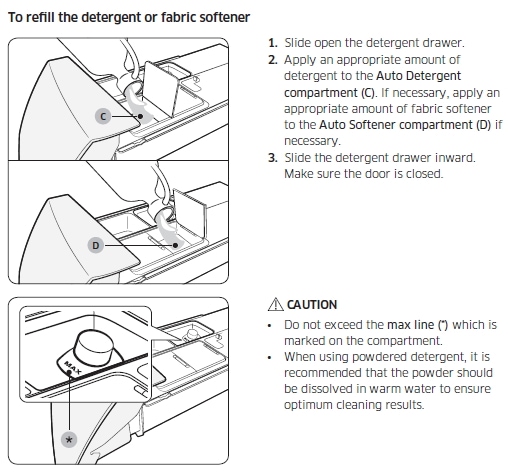
Using the wrong detergent or incorrect amounts is one of the top causes of problems in Samsung washing machines. Following these rules protects your appliance and ensures cleaner clothes.
Use Only HE Detergent
Samsung washing machines require HE (High Efficiency) detergent exclusively. Regular detergent produces too many suds, which can damage internal components and cause leaks.
Never use:
• Regular liquid or powder detergent
• Detergents with baking soda or essential oils
• Organic or natural detergents
• Non-HE pods or sheets
Only use concentrated HE detergent in powder or liquid form. Pods and sheets are acceptable only if placed directly in the drum, not in the dispenser.
Measure Detergent Accurately
Overdosing is one of the top causes of residue and odor in Samsung washers. Always follow the detergent bottle instructions and never exceed the MAX line in the detergent drawer.
Tips:
• Use the cap or a measuring spoon for precision
• For heavily soiled loads, increase soil level setting, not detergent amount
• On Auto Dispense models, fill the reservoir up to the mark (holds roughly 12 loads)
If your detergent dose exceeds the MAX line, reduce load size or switch to a more concentrated brand.
Load Detergent Based on Model Type
Front Load and Standard Top Load:
• Liquid detergent: Pour into the main wash compartment (leftmost drawer section)
• Powder detergent: Remove the liquid cup and pour powder into the main wash area
• Fabric softener: Add to the middle compartment
• Detergent pods or sheets: Place in the drum first, then add clothes
Flex Wash (Dual Washer) Models:
• Upper Mini Washer: Use the “Aqua Pebble.” Fill it with detergent (do not exceed MAX), place under laundry in the tub. Do not use pods in the upper washer.
• Lower Washer: Follow standard front-load rules (pods in drum, detergent in drawer)
Select the Right Wash Cycle
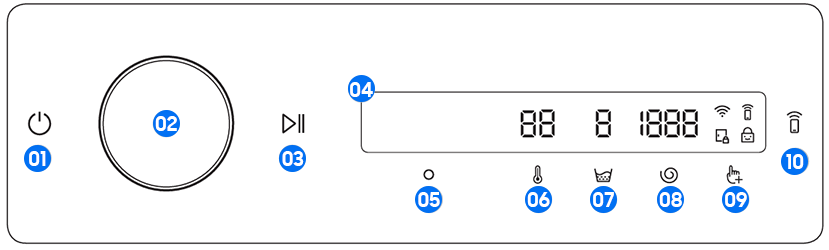
Choosing the correct cycle protects your clothes and ensures optimal cleaning. Samsung offers dozens of cycles, but these are the most common and useful.
Match Cycle to Fabric Type
Cotton: Best for towels, sheets, underwear, and cotton shirts. The machine automatically adjusts rinse count.
Synthetics: Designed for polyester, nylon, and blended fabrics. Uses gentler agitation to prevent pilling.
Colours: Extra rinses and reduced spin speed help prevent fading in colored garments.
Bedding: For sheets, comforters, and duvets. Limit load to under 2.0 kg and wash one type at a time.
Delicates: Use for bras, lingerie, and sheer fabrics. Recommended with liquid detergent and low spin.
Wool: Only for machine-washable wool. Load under 2.0 kg. Uses soaking and pulsating action to prevent shrinkage.
Use Specialized Cycles for Specific Needs
Hygiene Steam: Eliminates bacteria and allergens. Set temperature to 60°C or higher for full sterilization. Ideal for baby clothes and undergarments.
Super Eco Wash: Uses Ecobubble to clean at low temperatures, saving energy without sacrificing performance.
Heavy Duty or Deep Wash: For muddy workwear, grass-stained clothes, or heavily soiled items.
Pet Care Wash: Removes up to 6x more pet hair using dual lint filters. Available on select impeller top loads.
Deep Conditioning: Adds extra softener and moisture, great for towels and plush fabrics.
Choose Quick Cycles for Light Loads
15′ Quick Wash: For lightly soiled clothes under 2.0 kg. Use less than 20ml liquid or 20g powder detergent.
Quick Wash (30-min): Slightly longer for small mixed loads.
Super Speed Wash: Completes full cycle in roughly 28 minutes on high-end models.
Note: Selecting a higher temperature on any quick cycle will extend the time beyond the advertised duration.
Run Utility and Maintenance Cycles
Drum Clean or Eco Tub Clean: Removes mold, bacteria, and residue. Run every 20 to 40 washes or once a month. Run empty without detergent or bleach, or use Cotton cycle at 90°C.
Rinse + Spin: Adds extra rinse, perfect for adding softener post-wash or rinsing hand-washed items.
Drain or Spin: Drains water and spins out moisture. Useful to restart a cycle or dry clothes faster.
Spin Only: Removes water without washing, ideal after hand-washing.
Wrinkle Care: Tumbles clothes periodically after wash to reduce creasing.
Energy Saving: Gentle, low-power cycle (roughly 56 minutes) for lightly soiled items.
Start and Control the Wash Cycle
Once you’ve loaded clothes and added detergent, it’s time to start the cycle. Follow these steps for proper operation.
Power On and Select a Program
- Press Power to turn on the machine.
- Turn the Cycle Selector dial or press the numbered program button. On fully automatic top loads, hold the button 3 seconds until a star appears to activate.
- Adjust settings: Temp (Cold for colors, 30°C to 40°C for daily wash, 60°C+ for hygiene), Spin Speed (up to 1400 RPM, reduce for delicates), Soil Level (Normal or Heavy), and Water Level on top loads.
Add Smart Options Before Starting
Press Options to enable advanced features.
Bubble Soak: Activates Ecobubble to create micro-bubbles that penetrate fabric faster, ideal for cold washes.
Easy Iron: Reduces wrinkles by lowering spin speed and adding tumbling.
Delay Start or Delay End: Set start time (e.g., 3 hours later) to use off-peak electricity, or set end time so laundry is ready in the morning.
Sound Control: Long-press Power to mute operation sounds, perfect for nighttime use.
Press Start and Monitor Operation
Press Start/Pause to begin.
Top Load Tip: Ensure lid is fully closed. The machine will spin briefly to sense load weight and balance. This is normal.
Front Load Tip: Door locks automatically once water fills. Do not force open during cycle.
Pause, Stop, or Add Clothes Mid-Cycle
Sometimes you forget an item or need to stop the cycle. Here’s how to handle these situations safely.
Can You Add Clothes Mid-Cycle?
Most Samsung models do not allow adding clothes after the cycle starts. The door or lid locks for safety and balance.
Exception: Some top-load models with clear lids allow visual monitoring, but still lock during operation.
To add forgotten items:
1. Press Start/Pause to pause.
2. Wait for the lock icon to disappear.
3. Open lid or door, add items, close securely.
4. Press Start/Pause to resume.
If the machine has already filled with water or heated, it may not unlock until cooled.
Change or Cancel a Cycle
To change cycle:
1. Press Start/Pause to stop.
2. Select new cycle.
3. Press Start/Pause again.
To cancel completely: Press Stop or hold Start/Pause for 3 seconds (varies by model).
Use Smart Features via SmartThings App
Samsung washers offer smart connectivity that makes laundry management much more convenient.
Connect to Samsung SmartThings
Download the SmartThings app and connect your washer to Wi-Fi.
Features:
• View real-time status (e.g., “41 minutes remaining”)
• Start, pause, or monitor cycles remotely
• Receive alerts for maintenance (e.g., filter cleaning)
• Get troubleshooting help via Smart Care
Pro Tip: Smart features may add a few minutes to cycle time due to system checks.
Maintain Your Samsung Washer

Regular maintenance prevents odors, mold, and mechanical failure. A well-maintained washer lasts longer and cleans better.
Clean the Drum Monthly
Run Eco Tub Clean every 20 to 40 washes.
Steps:
1. Leave drum empty.
2. Select Drum Clean or Tub Clean cycle.
3. Do not add detergent or bleach unless your manual says to.
4. Press Start.
Alternatively, use Cotton cycle at 90°C to sanitize.
After every wash: Leave the door or lid open to dry out moisture and prevent mold.
Clean Detergent Drawer and Filter
Detergent Drawer:
1. Pull out by pressing the release tab.
2. Scrub all compartments with a toothbrush.
3. Rinse and reinsert fully.
Front Load Drain Filter:
• Located behind front kick panel
• Place towel underneath
• Turn filter counterclockwise to open
• Remove lint and debris
• Reinstall tightly
Top Load Lint Filter: Check and clean after heavy loads.
Descale and Wipe Regularly
In hard water areas, run a descaling cycle every 3 months using Samsung-approved cleaner or citric acid solution.
Wipe the rubber door seal (front load), drum interior, control panel, and exterior with a damp cloth regularly.
Troubleshoot Common Error Codes
When your Samsung washer displays an error code, here’s how to fix the most common issues.
Fix UE (Unbalanced Load)
Cause: Clothes bunched on one side.
Solution:
• Pause cycle
• Redistribute laundry evenly around drum or agitator
• Restart
Prevent by mixing large and small items and avoiding single heavy items like one towel.
Solve 4C (Water Not Filling)
Check:
• Water supply valves: Ensure fully open
• Inlet hoses: No kinks or blockages
• Water pressure: Must be above minimum threshold
Try turning off and on both machine and water supply.
Clear 5C (Drain Error)
Causes: Clogged filter, blocked hose, or hose inserted too deep into standpipe.
Fix:
• Clean drain filter
• Check drain hose for kinks
• Ensure hose loop is not more than 15 cm into standpipe
Disable Child Lock
If buttons do not respond, Child Lock may be on.
To unlock: Long-press the two lock icons (or Power + Options) for 3 seconds.
Note: On many models, Child Lock cannot be disabled once a cycle starts.
Load Your Washer Properly for Best Results
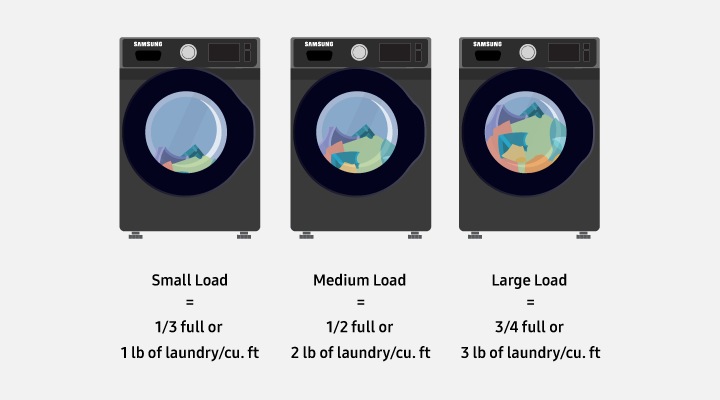
Proper loading technique directly impacts cleaning performance. Follow these guidelines for optimal results.
Distribute Laundry Evenly
• Alternate heavy items (towels, jeans) with light items (shirts, socks)
• Avoid overloading. Leave space at the top (do not pack past the last baffle)
• Overloading reduces cleaning and increases drying time
Respect Weight Limits
• Wool and Bedding cycles: Maximum 2.0 kg
• Quick Wash: Maximum 2.0 kg
• Standard cycles: Follow machine capacity (e.g., 8kg, 10kg)
Use the Auto Sensing feature to let the machine detect load size automatically.
Frequently Asked Questions About Samsung Washing Machines
What type of detergent should I use in my Samsung washing machine?
Use only HE (High Efficiency) detergent. Regular detergent creates too many suds and can damage internal components. Both powder and liquid HE detergents work well, though liquid is better for cold water washes and stain pre-treatment.
Can I add clothes after the wash cycle starts?
Most Samsung models do not allow adding clothes once the cycle begins because the door locks for safety. Some top-load models with clear lids may allow it, but you must pause the cycle, wait for the lock to release, then add items and restart.
How often should I run the drum clean cycle?
Run the Drum Clean or Eco Tub Clean cycle every 20 to 40 washes, or at least once a month. This removes mold, bacteria, and residue that cause odors. Always run it with an empty drum and no detergent.
What does the UE error code mean on my Samsung washer?
UE means unbalanced load. Clothes have gathered on one side of the drum. Pause the cycle, redistribute laundry evenly, and restart. Mix heavy and light items to prevent this error.
Where do I put detergent pods in a Samsung washing machine?
Always place detergent pods directly in the drum before adding clothes. Never put pods in the detergent drawer. They will not dissolve properly and can clog the system.
How do I connect my Samsung washer to the SmartThings app?
Download SmartThings from your app store, create an account, and add your washer by selecting “Add Device” and following the Wi-Fi pairing instructions. Once connected, you can monitor cycles, start or pause remotely, and receive maintenance alerts.
Key Takeaways for Using Your Samsung Washing Machine
Using your Samsung washing machine correctly means cleaner clothes, fewer repairs, and longer appliance life. Stick to HE detergent only, measure carefully, and never exceed the MAX line in the dispenser. Choose the right cycle for your fabric type, respect weight limits (especially for Wool and Bedding cycles at 2.0 kg), and always place pods in the drum, never the drawer.
Maintain your washer by running Drum Clean monthly, leaving the door open after each use, and cleaning the detergent drawer and filter regularly. Use SmartThings for remote monitoring and troubleshooting. By following these steps, your Samsung washer will deliver fresh, clean laundry for years to come.



