
You’re mid-cycle and realize a sock is stuck in the door seal. Or the wash is done, but the door won’t budge. If you own a Samsung washing machine, you’ve encountered its smart safety lock designed to protect you from burns, flooding, or mechanical hazards. But when you need access fast, knowing how to open a Samsung washing machine safely becomes essential.
The good news is Samsung builds in multiple ways to open the door during, after, or even before a cycle, as long as safety conditions are met. This guide walks you through every scenario using methods supported by Samsung’s design. No guesswork. No forced entry. Just clear, step-by-step solutions that preserve your machine’s integrity and keep you safe.
Pause to Add or Remove Laundry
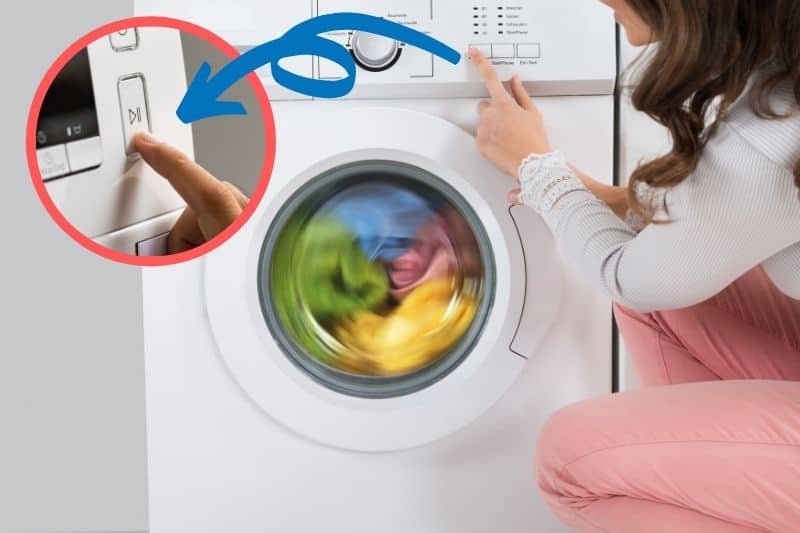
Access Within the First 5 Minutes
Samsung allows quick access to the drum during the early phase of most cycles. If you forgot an item or need to remove something, act fast. You typically have a five-minute window after starting the cycle.
Here is how to open the door safely:
- Press the Start/Pause button to pause the cycle.
- Wait for the Door Lock indicator to stop blinking, which takes about one to two minutes.
- Once the light is off or solid, open the door carefully.
- Add or remove your laundry items.
- Close the door firmly and press Start/Pause again to resume.
Important: If the door will not open immediately, do not force it. A blinking lock light means water level or temperature is still too high. Wait for it to stabilize to avoid damaging the latch or hinge.
When the Door Will Not Unlock Immediately
Even within the five-minute window, the door may stay locked if the drum has filled with hot water or is under pressure. The machine prioritizes safety over convenience.
Watch for these signals:
• Blinking Door Lock icon: Wait. Temperature or water level is still too high.
• No sound from pump: The drain cycle has not started yet.
• Steam visible around door: Internal heat is high, so wait for cooling.
Wait one to two minutes after pausing. The system will automatically drain excess water and cool down, then unlock. Forcing the door can damage the latch or hinge, and patience prevents costly repairs.
Unlock With Water in the Drum
Use Spin Only to Drain Water
If more than five minutes have passed or the drum is full, the door stays locked. To open it, you must remove the water first. The fastest, safest way is using the Spin Only function. This feature bypasses rinsing and spinning logic, triggering a quick drain so the lock releases.
Follow these steps to unlock mid-cycle with water present:
- Press the Spin button repeatedly until “Spin Only” appears on the display.
- Select your desired spin speed. Higher speeds mean faster drainage.
- Press and hold Start/Pause to begin the drain cycle.
- Listen for the pump. Gurgling or clunking sounds mean water is draining.
- Once drained, which usually takes one to two minutes, the door unlocks automatically.
Why this works: The safety sensor detects no water weight, so it disengages the lock. You do not need to unplug or manually drain unless the pump fails.
Manual Drain Via Filter Access
If the machine will not spin or respond, use the emergency drain hose behind the front filter cover. This method is for power failures, pump jams, or electronic errors.
What you will need:
• Shallow tray or bucket that holds two to four liters
• Towels for spills
How to manually drain the water:
- Place the tray under the filter access panel at the bottom front of the machine.
- Open the small square cover by pulling it down.
- Unscrew the debris filter slowly. Water will start to trickle out.
- Pull out the white emergency drain hose.
- Remove the cap and let water flow into the tray.
- Once fully drained, reinsert the hose, screw in the filter, and close the panel.
- Power the machine back on. The door should now unlock.
Warning: Water may gush out quickly. Never open the filter on a hot cycle. Scalding water can spray out and cause burns.
Open After Cycle Completion
Door Stuck Post-Wash
The cycle ends, the beeps stop, but the door will not open. This is common with high-temp cycles. Residual heat or pressure keeps the thermal lock engaged.
The standard fix is straightforward. Wait five to ten minutes after the cycle ends. Do not force the door. The lock will release once internal temperature drops. This is normal behavior, especially on sanitize or heavy-duty cycles.
Reset When Door Remains Locked

If the machine is empty, cool, and still locked, it may be stuck due to a software glitch or capacitor charge. The hard reset procedure works in these situations.
Steps to perform a hard reset:
- Unplug the washer from the power outlet.
- Wait 60 minutes. This fully discharges internal capacitors.
- Plug the machine back in.
- Try opening the door again.
This reset clears temporary errors and forces the control board to recheck water and temperature sensors. Most lock-hold issues resolve after this step.
Use AddWash for Mid-Cycle Access

Open Small Door Without Stopping Cycle
On select Samsung models, the AddWash door lets you add items without draining or pausing the main cycle. It is a small secondary door built into the main door, perfect for forgotten socks, extra detergent, or removing a single garment.
When you can use the AddWash door:
• The AddWash indicator lights up on the display.
• Water level is low and temperature is safe.
• Main cycle continues uninterrupted.
Steps to use AddWash:
- Wait for the AddWash light to turn on.
- Gently pull the small door handle.
- Add or remove items quickly.
- Close firmly until it clicks.
Cannot open AddWash? The main cycle may be in a high-temp or high-water phase. Wait until the icon illuminates. It only activates when conditions are safe.
Troubleshoot Common Lock Issues
Fix Door That Will Not Unlock
When the door stays locked despite no water or power, check these common causes:
| Issue | Solution |
|---|---|
| Water left in tub | Run Spin Only or drain manually |
| Filter clogged with lint | Clean debris filter monthly |
| Overloaded drum | Remove a few items and redistribute load |
| Door not closed properly | Reopen and shut firmly. Listen for the click. |
| Child Lock enabled | Press and hold Child Lock button for three seconds to disable |
Prevent Future Lock Problems
Keep your Samsung washer door functioning smoothly with these habits:
• Clean the filter every one to two months to prevent drainage issues.
• Inspect the door seal for trapped debris like coins, hair ties, or fabric scraps.
• Avoid overloading the drum. It strains the motor and affects sensor readings.
• Use HE detergent only. Excess suds can trick sensors into thinking water remains.
Pro tip: After each wash, leave the door slightly ajar to dry the gasket and prevent mold, odors, and seal warping.
Reset and Power Cycle
Perform a System Reset
When electronic locks glitch, a full power cycle often restores normal function.
How to reset your Samsung washer:
- Press Power to turn off the machine.
- Unplug from the wall or switch off the circuit breaker.
- Wait 10 to 60 minutes. Wait longer if thermal lock is active.
- Restore power.
- Press Power to restart the machine.
This clears error codes, resets the control board, and often releases a stuck door. Samsung recommends a 60-minute wait for complete capacitor discharge in service manuals. Do not rush this step.
Frequently Asked Questions About Opening a Samsung Washing Machine
Can I open my Samsung washing machine while a cycle is running?
You can only open the door during the first five minutes of a cycle, provided the water level and temperature are safe. After that window closes, you must pause the cycle, drain the water using Spin Only, or wait for the cycle to complete.
What does it mean when the Door Lock icon is blinking?
A blinking Door Lock icon indicates that water level or temperature inside the drum is still too high for safe opening. Wait one to two minutes for conditions to normalize. The light will turn solid or go off when it is safe to open.
How do I open the door if there is water still in the drum?
Use the Spin Only function to drain the water. Press the Spin button until “Spin Only” appears, select a speed, and press Start/Pause. Once drained, the door unlocks automatically. If this does not work, manually drain via the emergency filter hose.
Why will the door not open after the wash cycle ends?
The door may remain locked due to residual heat or pressure inside the drum. Wait five to ten minutes after the cycle completes. If it still will not open, perform a hard reset by unplugging the machine for 60 minutes.
What is the AddWash feature and how does it work?
AddWash is a small secondary door on select Samsung models that lets you add forgotten items without stopping the main cycle. Wait for the AddWash indicator to light up, then open the small door to add or remove laundry.
How do I disable Child Lock on my Samsung washer?
Press and hold the Child Lock button for three seconds. The indicator light will turn off, and you can then open the door and access controls.
Key Takeaways for Opening Your Samsung Washing Machine
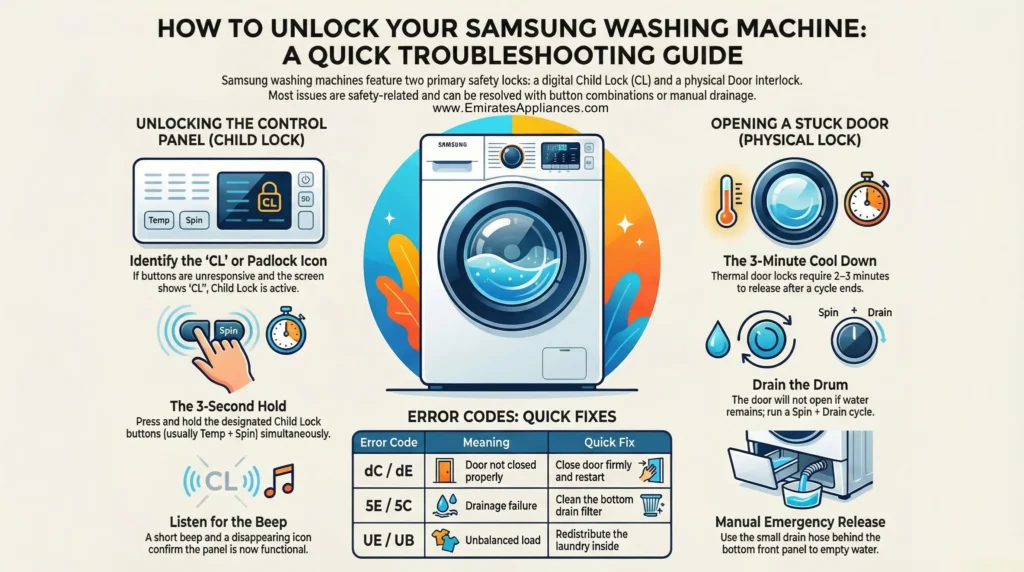
Knowing how to open a Samsung washing machine is not about forcing access. It is about working with the machine’s safety systems. Whether you are using the five-minute add-laundry window, draining water with Spin Only, or resetting a stuck lock, every solution follows a logical, built-in process.
The three most important points to remember are: First, never force the door open. A blinking lock light means wait. Forcing it damages the latch and voidswarranty. Second, use Spin Only to drain water quickly when needed. This is the safest method to unlock mid-cycle. Third, perform a 60-minute hard reset for persistent electronic lock issues before calling for service.
By following these steps, you avoid damage, extend your washer’s life, and handle hiccups with confidence. If problems persist after resets and draining, contact Samsung support. A faulty door lock motor or control board may need professional service.



